


文本框格式不正确
我想让文本框在屏幕底部的大部分区域内占据空间,滚动条只在最右边的一侧呈现。但当前我的代码让文本框和滚动条在窗口中部各占一半。这是为什么?我该如何修复?
#in windowstart
import tkinter as tk
from tkinter import ttk,font
def create_root():
    root = tk.Tk()
    root.title("Aghast")
    root.geometry("1400x800")
    root.configure(background="dark grey")
    root.rowconfigure(0,weight=1)
    root.rowconfigure(1,weight=1)
    root.columnconfigure(0,weight=1)
    return root

#in another file

root = create_root()
main_container = tk.Frame(root,height=800,width=1400)
main_container.grid(row=0,column=0,sticky="nsew")

root.grid_rowconfigure(0, weight=1)
root.grid_columnconfigure(0, weight=1)

main_container.rowconfigure(0, weight=3)
main_container.rowconfigure(1,weight=1)
main_container.rowconfigure(2,weight=1)
main_container.columnconfigure(0, weight=1)

logbox_frame = tk.Frame(root)
logbox_frame.grid(row=1,column=0,sticky=tk.EW)

room_container = tk.Frame(main_container)
room_container.grid(row=0, column=0, sticky="nsew")
room_container.configure(background="dark gray")

class logbox(tk.Frame):
    def __init__(self,parent):
        super().__init__(parent)
        self.textframe = tk.Frame(self)
        self.textframe.columnconfigure(0,weight=10)
        self.textframe.columnconfigure(1,weight=1)
        for i in range(6):
            self.textframe.rowconfigure(i, weight=1 if i == 5 else 0)
        self.textframe.grid(row=0, column=0, sticky="nsew")

        self.scrollbar = tk.Scrollbar(self.textframe)
        self.scrollbar.grid(row=5,column=1,sticky="e")

        self.textbox = tk.Text(
            self.textframe,
            height=8,
            wrap="word",
            yscrollcommand=self.scrollbar.set,
        )
        self.textbox.grid(row=5,column=0,sticky="nsew")
        self.textbox.config(state="disabled")

        self.scrollbar.config(command=self.textbox.yview)

        self.textbox.tag_config("combat", foreground="red")
        self.textbox.tag_config("treasure", foreground="gold")
        self.textbox.tag_config("lore", foreground="purple")
        self.textbox.tag_config("peaceful", foreground="green")
        self.textbox.tag_config("default", foreground="black")

        self.grid(row=5, column=0,columnspan=2)


logbox_frame.tkraise()
room_container.tkraise()
Logbox = logbox(logbox_frame)
Logbox.tkraise()

root.mainloop()
解决方案
你有这么多嵌套的 Frame,所以很难找出问题所在。
解法需要在三个地方进行修改,才能看到结果。
我尝试了多种组合,结果对我来说是可行的。
logbox_frame.columnconfigure(0, weight=1)  # <--- weight

class logbox(tk.Frame):
    def __init__(self, parent):
        super().__init__(parent)

        self.columnconfigure(0, weight=1)  # <-- weight

        # ... code ...

        self.grid(row=0, column=0, columnspan=2, sticky="news")  # <--- sticky
完整可运行的代码。
我在某些元素中添加了 background=,以便更清楚地看到哪些元素没有使用全宽。你可以把它移除。
它还需要在带有 Scrollbar 的列中使用 weight=0,以实现最小宽度。
顺便说一句:推荐把 UpperCaseNames 用于类名、lower_case_names 用于实例——例如用 class Logbox() 和 logbox = Logbox(..),代替 class logbox() 和 Logbox = logbox(..)(这与代码中其他控件的命名风格类似)。
(更多:PEP 8 -- Style Guide for Python Code)
import tkinter as tk
from tkinter import ttk, font


def create_root():
    root = tk.Tk()
    root.title("Aghast")
    root.geometry("1400x800")
    root.configure(background="dark grey")
    root.rowconfigure(0, weight=1)
    root.rowconfigure(1, weight=1)
    root.columnconfigure(0, weight=1)
    return root


# in another file

root = create_root()
main_container = tk.Frame(root, height=800, width=1400)
main_container.grid(row=0, column=0, sticky="nsew")

root.grid_rowconfigure(0, weight=1)
root.grid_columnconfigure(0, weight=1)

main_container.rowconfigure(0, weight=3)
main_container.rowconfigure(1, weight=1)
main_container.rowconfigure(2, weight=1)
main_container.columnconfigure(0, weight=1)

logbox_frame = tk.Frame(root, background="red")
logbox_frame.grid(row=1, column=0, sticky=tk.EW)
logbox_frame.columnconfigure(0, weight=1)  # <-- weight

room_container = tk.Frame(main_container)
room_container.grid(row=0, column=0, sticky="nsew")
room_container.configure(background="dark gray")


class Logbox(tk.Frame):
    def __init__(self, parent):
        super().__init__(parent, background="blue")
        self.columnconfigure(0, weight=1)  # <-- weight

        self.textframe = tk.Frame(self, background="green")
        self.textframe.columnconfigure(0, weight=1)  # <-- you can use 1
        self.textframe.columnconfigure(1, weight=0)  # <-- need 0 to get minimal width for Scrollbar

        for i in range(6):
            self.textframe.rowconfigure(i, weight=1 if i == 5 else 0)
        self.textframe.grid(row=0, column=0, sticky="news")

        self.scrollbar = tk.Scrollbar(self.textframe)
        self.scrollbar.grid(row=5, column=1, sticky="e")

        self.textbox = tk.Text(
            self.textframe,
            height=8,
            wrap="word",
            yscrollcommand=self.scrollbar.set,
            background="yellow",
        )

        self.textbox.insert("end", "Hello World!")

        self.textbox.grid(row=5, column=0, sticky="nsew")
        self.textbox.config(state="disabled")

        self.scrollbar.config(command=self.textbox.yview)

        self.textbox.tag_config("combat", foreground="red")
        self.textbox.tag_config("treasure", foreground="gold")
        self.textbox.tag_config("lore", foreground="purple")
        self.textbox.tag_config("peaceful", foreground="green")
        self.textbox.tag_config("default", foreground="black")

        self.grid(row=5, column=0, columnspan=2, sticky="news")  # <-- sitcky


logbox_frame.tkraise()
room_container.tkraise()
logbox = Logbox(logbox_frame)
logbox.tkraise()

root.mainloop()
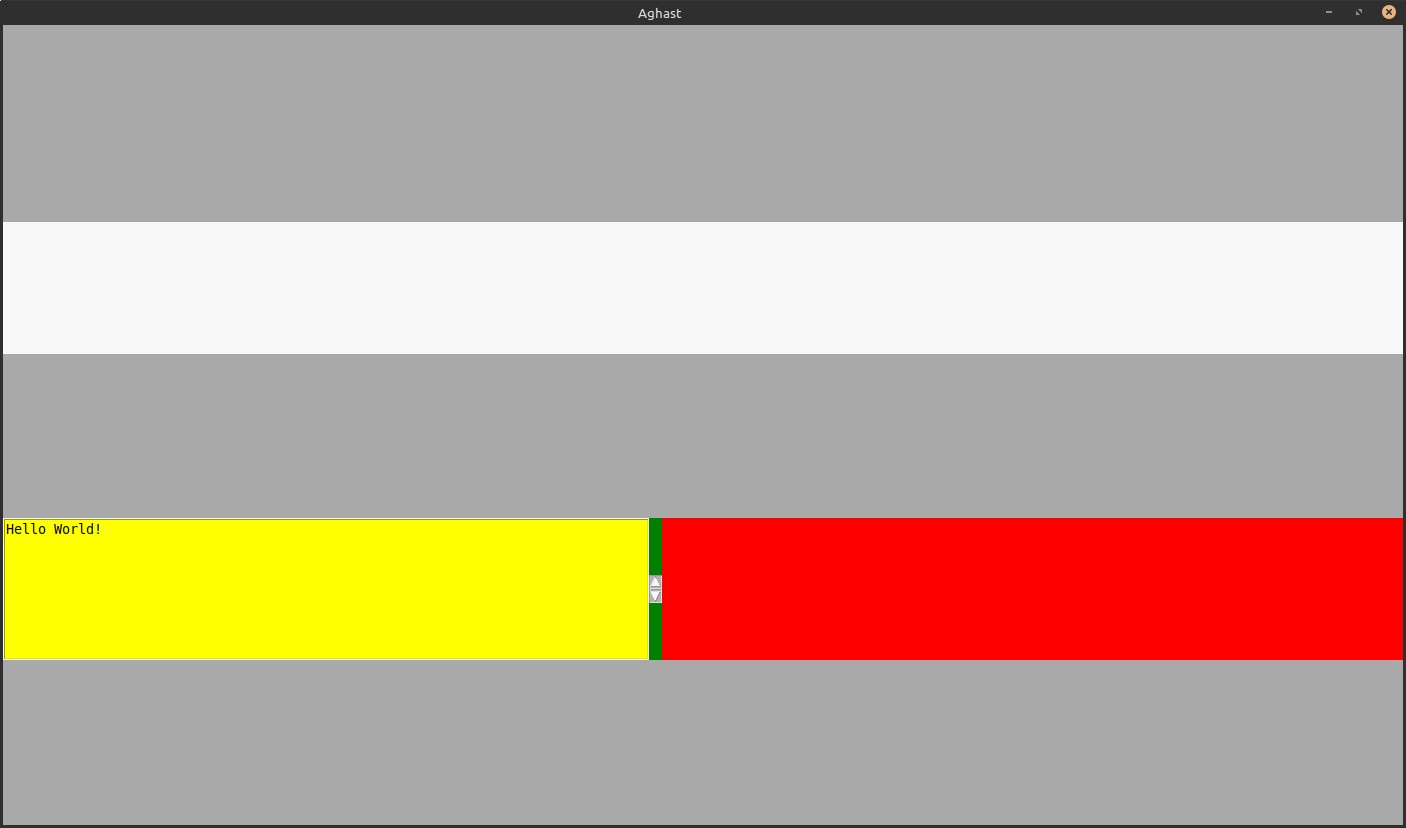
结果:
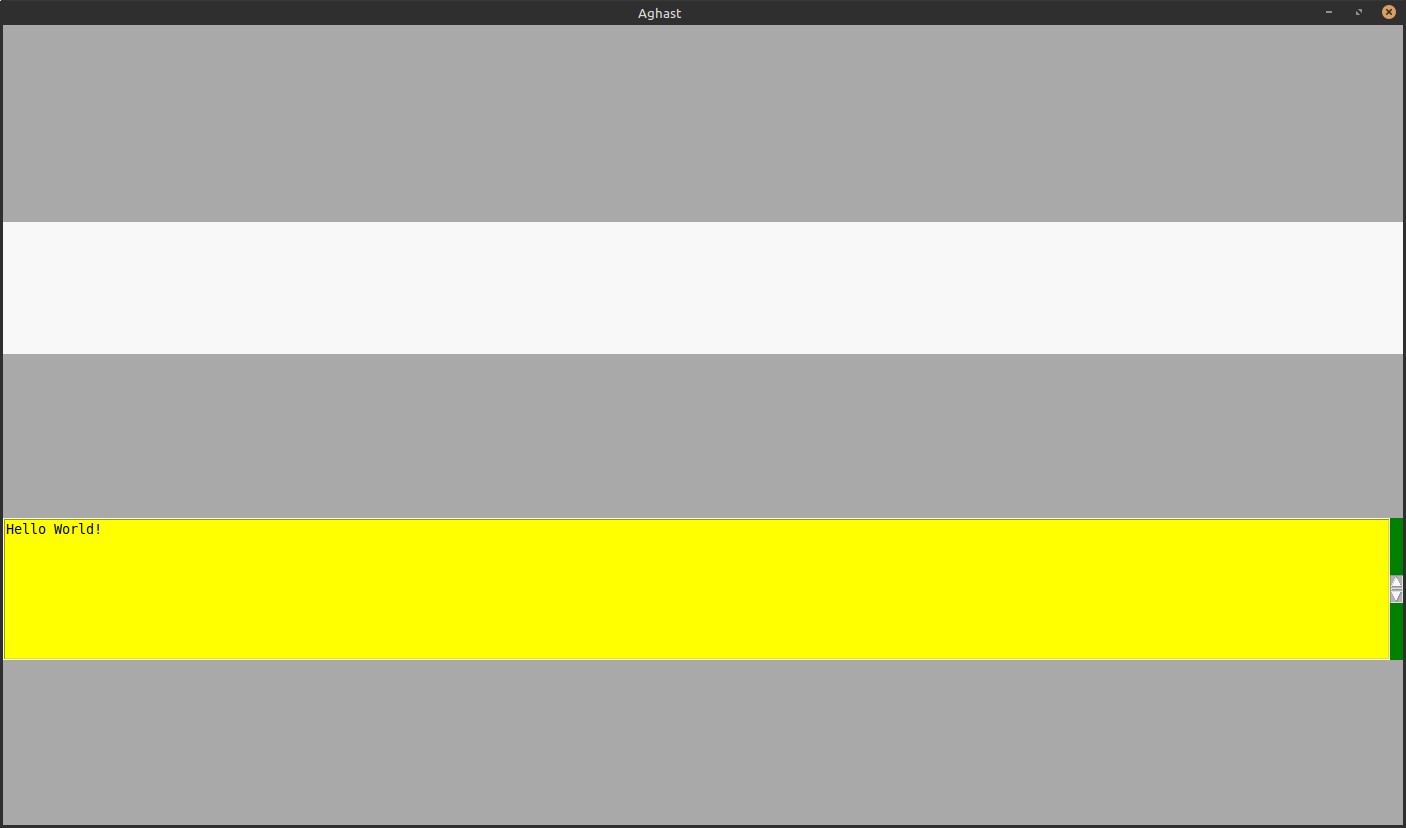
之前:
站内所有文章版权归属LeftHeroAI导航站,无授权禁止任何主体转载、抄袭、复制内容,亦不得私自架设镜像站点。一经侵权,本站将通过法律途径追责。
相关文章






汇集全球数千款 AI 工具,每日持续更新,配套 AI 开发学习资源,轻松用 AI 提升工作效率。快捷键 Ctrl+D/⌘+D 一键收藏本站。