


IntelliJ IDEA - 无法启动IDE:由于指定了Java系统类加载器属性,已归档的非系统类被禁用
我刚从官方网站安装了IntelliJ IDEA的新版本(IntelliJ IDEA 2026.1)。
当我尝试打开它时,遇到了这个问题。
下面是截图
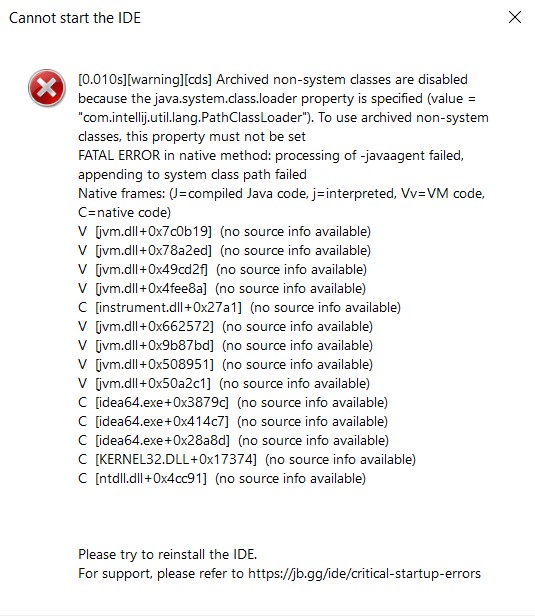
下面是我的idea64.exe.vmoptions
-Xms128m
-Xmx2048m
-XX:JbrShrinkingGcMaxHeapFreeRatio=40
-XX:ReservedCodeCacheSize=512m
-XX:+HeapDumpOnOutOfMemoryError
-XX:-OmitStackTraceInFastThrow
-XX:CICompilerCount=2
-XX:+IgnoreUnrecognizedVMOptions
-XX:+UnlockDiagnosticVMOptions
-XX:TieredOldPercentage=100000
-ea
-Dsun.io.useCanonCaches=false
-Dsun.java2d.metal=true
-Djbr.catch.SIGABRT=true
-Djdk.http.auth.tunneling.disabledSchemes=""
-Djdk.attach.allowAttachSelf=true
-Djdk.module.illegalAccess.silent=true
-Djdk.nio.maxCachedBufferSize=2097152
-Djava.util.zip.use.nio.for.zip.file.access=true
-Dkotlinx.coroutines.debug=off
-Dskiko.rendering.useScreenMenuBar=false
-Djava.nio.file.spi.DefaultFileSystemProvider=com.intellij.platform.core.nio.fs.MultiRoutingFileSystemProvider
我应该如何修复它?
解决方案
我已经解决了这个问题。下面是我执行的步骤。
1) 打开命令提示符
2) 输入以下命令
set IDEA_JDK=%JAVA_HOME%
setx IDEA_JDK "%JAVA_HOME%"
流程完成后,IntelliJ IDEA就能正常打开,未再出现任何问题。
站内所有文章版权归属LeftHeroAI导航站,无授权禁止任何主体转载、抄袭、复制内容,亦不得私自架设镜像站点。一经侵权,本站将通过法律途径追责。
相关文章






汇集全球数千款 AI 工具,每日持续更新,配套 AI 开发学习资源,轻松用 AI 提升工作效率。快捷键 Ctrl+D/⌘+D 一键收藏本站。