


PowerShell错误:在管道元素中,& 之后的表达式生成了一个无效的对象
我写了一个脚本,结果抛出如下错误:
管道元素中 '&' 之后的表达式返回了一个无效对象。它必须是一个命令名称、一个脚本块,或一个CommandInfo对象。
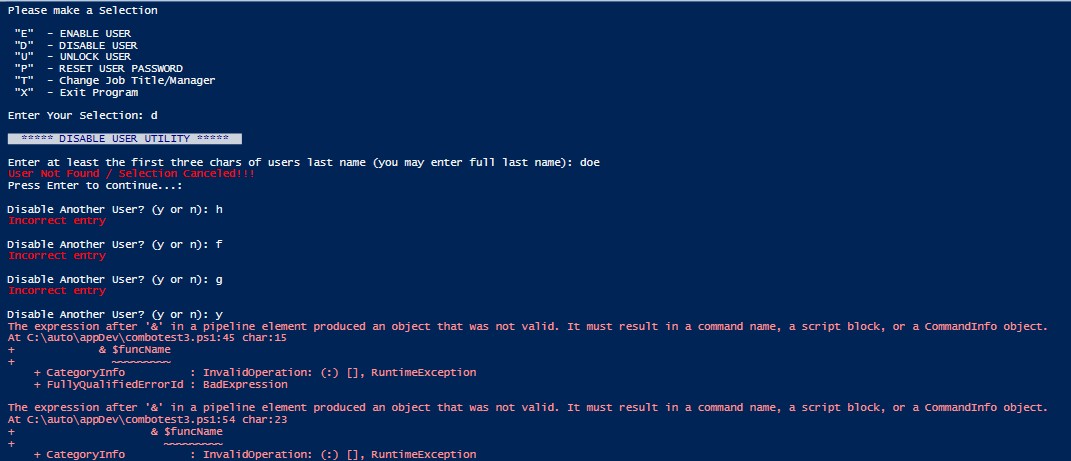
当提示用户输入“y或 n”的回答时,如果输入了错误的回答,就会被重新提示为Y 或N,然后再输入正确的“y”或“n”。下面是相关代码的片段。还有要注意的一点是,如果用户一开始就输入正确的回答,程序就能正常工作。
function SelectUserGui {
    param(
        $search
    )
    #Returns a gui window to select user
    $selection = Get-ADUser -Filter "surname -like '$search'" -Properties * |
        Select-Object name, samaccountname, DistinguishedName, Enabled, EmployeeID, LockedOut |
        Out-GridView -PassThru -Title 'Choose a user'

    if (-not $selection) {
        Write-Host 'User Not Found / Selection Canceled!!!' -ForegroundColor Red
        Pause
    }
    return $selection
}

function tryAgain {
    param(
        $tryString,
        $funcName
    )

    $x = Read-Host $tryString
    if ($x -eq 'y') {
        & $funcName
    }
    elseif ($x -eq 'n') {
        Clear-Host
        main
    }
    else {
        Write-Host 'Incorrect entry' -ForegroundColor Red
        tryAgain $tryString
        & $funcName
    }
}

function disableUser {
    param (
        $aduser
    )
    $ticketNum = Read-Host "`nEnter the ServiceNow Ticket Number"
    $proceed = Read-Host "`nProceed with disabling for Leave Of Absence? (y or n)"
    if ($proceed -eq 'y') {
        Write-Host 'proceeding ...'
        Write-Host "`n PLEASE ADD FOLLOWING CLOSE NOTES to  TICKET $ticketNum :" -ForegroundColor cyan
        Write-Host "`n Disabled AD account per HR/Workday for LOA `n" -ForegroundColor cyan
        #$target = $ResultsArray[1][$selection]
        $aduser = Get-ADUser -Identity $selection.samaccountname -Properties *
        $prepend = "DISABLED per HR for LOA ($ticketNum) - "
        $desc = $aduser.description
        $loaDesc = $prepend + $desc
        Set-ADUser -Identity $selection.samaccountname -description $loaDesc
        Disable-ADAccount -Identity $selection.samaccountname
        Pause
        #tryAgain
    }
    else {
        Write-Host 'no changes will be made'
        Pause
        #tryAgain
    }
}

function DisableFunc {
    Write-Host "`n  ***** DISABLE USER UTILITY *****  " -ForegroundColor DarkBlue -BackgroundColor white
    $search = promptForUser
    $selection = SelectUserGui $search

    if ($selection.enabled -eq $True) {
        Write-Host "`nYou selected user " -NoNewline
        Write-Host $selection.Name -NoNewline -ForegroundColor Green
        Write-Host ' with user ID a of ' -NoNewline
        Write-Host $selection.samAccountName -NoNewline -ForegroundColor Green
        disableUser $selection
    }
    elseif ($selection.enabled -eq $False) {
        Write-Host "`nUser " -NoNewline
        Write-Host $selection.Name, '(' -NoNewline -ForegroundColor Yellow
        Write-Host $selection.samAccountName -NoNewline -ForegroundColor Yellow
        Write-Host ')' -NoNewline -ForegroundColor Yellow
        Write-Host ' is already ' -NoNewline
        Write-Host 'DISABLED' -NoNewline -ForegroundColor Yellow -BackgroundColor Red
    }

    $tryString = "`nDisable Another User? (y or n)"
    $funcName = 'DisableFunc'
    tryAgain $tryString $funcName
}
下面是一张截图,展示了在输入错误回答后,最终输入正确回答时失败的情况:
非常感谢你提供的任何见解。
解决方案
虽然不太容易看出,但问题是由于在 else 分支调用 tryAgain 时缺少一个参数所致:
else {
    Write-Host 'Incorrect entry' -ForegroundColor Red
    tryAgain $tryString # <- missing $funcName here
    & $funcName
}
这会导致如下错误:
& $null

# InvalidOperation: The expression after '&' in a pipeline element produced an...
个人建议,通常而言在PowerShell中不建议使用递归,但在这种情况下,这类打字错误尤其容易发生……
如果你使用的是必填参数,这本可以避免:
param(
    [Parameter(Mandatory)] $tryString,
    [Parameter(Mandatory)] $funcName
)
那么问题就会非常清楚:
Disable Another User? (y or n): asd
Incorrect entry

cmdlet tryAgain at command pipeline position 1
Supply values for the following parameters:
funcName:
但由于代码具有递归性质,仍然让人困惑……不如使用一个 while 循环,这样更易读:
function tryAgain {
    param(
        $tryString,
        $funcName
    )

    while ($true) {
        $x = Read-Host $tryString
        switch ($x.Trim()) {
            y {
                & $funcName # invoke
                return      # and exit
            }
            n {
                Clear-Host
                main        # <- Unclear what main is
                return      # exit, don't need to keep trying
            }
            default {
                Write-Host 'Incorrect entry' -ForegroundColor Red
            }
        }
    }
}
站内所有文章版权归属LeftHeroAI导航站,无授权禁止任何主体转载、抄袭、复制内容,亦不得私自架设镜像站点。一经侵权,本站将通过法律途径追责。
相关文章






汇集全球数千款 AI 工具,每日持续更新,配套 AI 开发学习资源,轻松用 AI 提升工作效率。快捷键 Ctrl+D/⌘+D 一键收藏本站。