


如何在Typst中使用cetz宏包为内容框定义可复用的样式?
我在定义可重用的内容框样式时遇到了困难。
期望:在下面的代码片段中,我想在白色圆圈旁边显示一个蓝色矩形框。我的目标是定义一种可以重复使用的样式,这样就不必一遍又一遍地输入。
实际行为:我没有收到错误,但显示的是“z=9”,周围没有预期的蓝色矩形框。
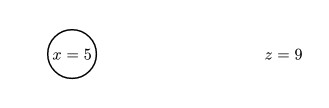
我该如何修复这个问题?
这是生成图片结果的代码:
#import "@preview/cetz:0.5.0"
#cetz.canvas({
import cetz.draw: *
content((0,0),[$x=5$],frame:"circle",padding:2pt,fill:white)

let agent_style = (frame:"rect",padding:2pt,fill:blue)
content((5,0),[$z=9$],style:agent_style)
})
解决方案
使用 .with() 来创建一个可重用的函数:
let styled = content.with(frame:"rect",padding:2pt,fill:blue)

styled((0,0), $x=5$)
styled((5,0), $z=9$)
https://typst.app/docs/reference/foundations/function/#definitions-with
或者构造一个 arguments 对象以实现重用:
#let args = arguments(stroke: red, inset: 1em, [Body])
#box(..args)
https://typst.app/docs/reference/foundations/arguments/
或者,这是我最原始的实现方式:
  let wedge = (..args) => edge(
    ..args,
    extrude: (-extrudeRadius,extrudeRadius),
    stroke: (thickness: strokeThickness),
    mark-scale: 180%
  )
  wedge(other args here)
  wedge(other args here)
  wedge(other args here)
站内所有文章版权归属LeftHeroAI导航站,无授权禁止任何主体转载、抄袭、复制内容,亦不得私自架设镜像站点。一经侵权,本站将通过法律途径追责。
相关文章






汇集全球数千款 AI 工具,每日持续更新,配套 AI 开发学习资源,轻松用 AI 提升工作效率。快捷键 Ctrl+D/⌘+D 一键收藏本站。