


我正在尝试在一张图片中检测ArUco标记。但检测并没有成功,即使图片中只有这个标记也会返回None吗?
import cv2
import numpy as np
import matplotlib.pyplot as plt

width = 1080
height = 1920


# create the dictionary for markers type
dictionary = cv2.aruco.getPredefinedDictionary(cv2.aruco.DICT_4X4_50)

# define the fonts for draw text on image
image = cv2.aruco.generateImageMarker(dictionary, 0, size_of_marker).astype(np.uint8)
image = cv2.cvtColor(image, cv2.COLOR_GRAY2BGR)

detector = cv2.aruco.ArucoDetector(dictionary, cv2.aruco.DetectorParameters())

# Detect ArUco markers in the image.
corners, ids, rejected = detector.detectMarkers(image)

print("Detected markers:", ids)
if ids is not None:
    cv2.aruco.drawDetectedMarkers(image, corners, ids)
    cv2.imshow('Detected Markers', image)
    cv2.waitKey(0)
    cv2.destroyAllWindows()
这是我目前用来创建并检测一个ArUco标记的代码。不过它不起作用,我也找不出原因。有人知道哪里出了问题吗?
解决方案
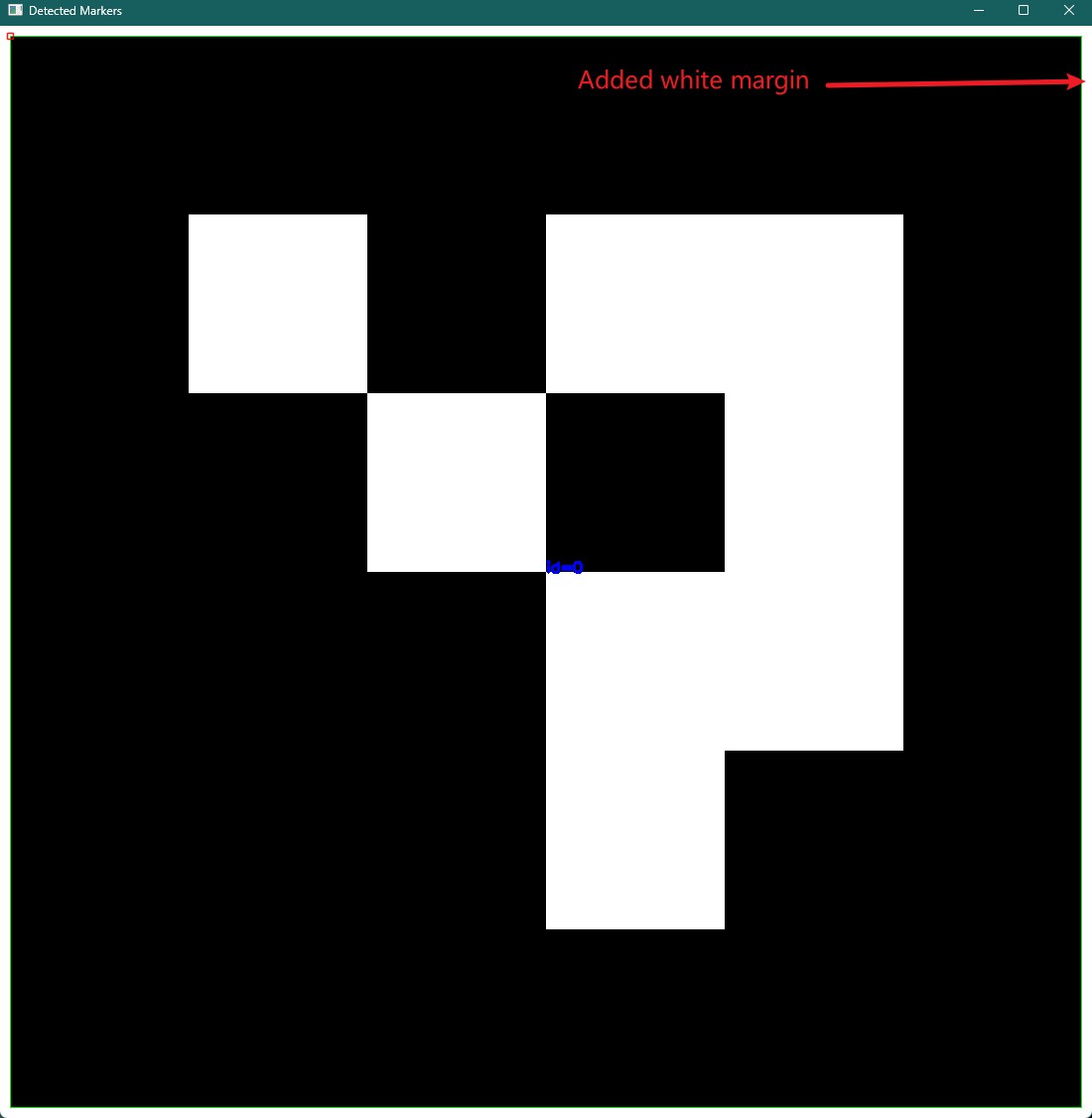
generateImageMarker() 仅生成规范的标记图像,不会添加任何外围边距。
ArUco检测器首先通过对图像进行阈值处理并提取轮廓来查找方形标记的候选项,具体请参阅 OpenCV文档。生成的标记外部黑色边框会与图像边界相接,因此无法被检测为轮廓。OpenCV还会使用 DetectorParameters.minDistanceToBorder 来过滤距离图像边界过近的候选项。
要解决这个问题,你可以在生成的标记周围添加一个白色边距,使用 cv2.copyMakeBorder:
import cv2
import numpy as np

width = 1080


# create the dictionary for markers type
dictionary = cv2.aruco.getPredefinedDictionary(cv2.aruco.DICT_4X4_50)

# define the fonts for draw text on image
image = cv2.aruco.generateImageMarker(dictionary, 0, width).astype(np.uint8)
# vvv Add a 10px white margin here vvv
image = cv2.copyMakeBorder(image, 10, 10, 10, 10, cv2.BORDER_CONSTANT, value=255)
image = cv2.cvtColor(image, cv2.COLOR_GRAY2BGR)

detector = cv2.aruco.ArucoDetector(dictionary, cv2.aruco.DetectorParameters())

# Detect ArUco markers in the image.
corners, ids, rejected = detector.detectMarkers(image)

print("Detected markers:", ids)
if ids is not None:
    cv2.aruco.drawDetectedMarkers(image, corners, ids)
    cv2.imshow("Detected Markers", image)
    cv2.waitKey(0)
    cv2.destroyAllWindows()
站内所有文章版权归属LeftHeroAI导航站,无授权禁止任何主体转载、抄袭、复制内容,亦不得私自架设镜像站点。一经侵权,本站将通过法律途径追责。
相关文章






汇集全球数千款 AI 工具,每日持续更新,配套 AI 开发学习资源,轻松用 AI 提升工作效率。快捷键 Ctrl+D/⌘+D 一键收藏本站。