


SwiftUI iOS 26 - 当Picker的选择将symbolVariant从 .none改为.fill时,工具栏菜单的标签图标会间歇性地消失约1秒
我在一个工具栏里有一个Menu,它的标签会根据一个内联Picker的选择,在.symbolVariant和.foregroundStyle之间变化。
从默认状态(无变体,主色)切换到活动状态(.fill,蓝色)时,图标有时会消失大约一秒,然后再以正确的样式重新出现。
只有在这个方向才会发生,返回到默认状态时从不闪烁。
这是间歇性的,但通过快速多次切换很容易复现。
我尝试了.contentTransition(.identity)、.symbolEffectsRemoved()、通过Task推迟状态更新,以及重构工具栏,但都没有帮助。
最低目标是iOS 18,并且只在iOS 26及以上版本出现。
若能提供一些说明,将不胜感激。
重现动图:
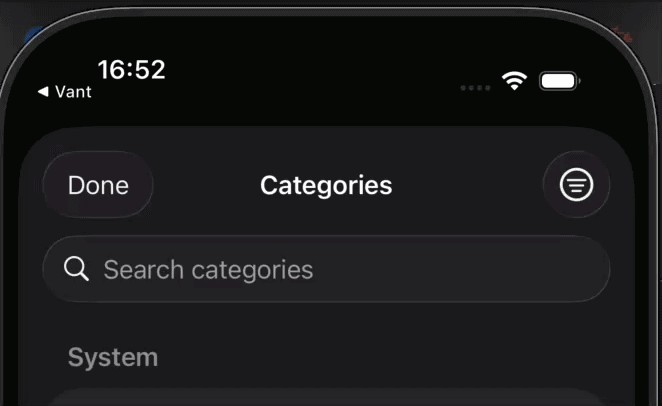
下面给出最小重现:
import SwiftUI

// MARK: - Filter Enum

enum ItemFilter: String, CaseIterable, Identifiable {
    case all
    case onlySystem
    case onlyCustom

    var id: Self { self }

    var title: String {
        switch self {
        case .all: "All"
        case .onlySystem: "Only system"
        case .onlyCustom: "Only custom"
        }
    }

    var icon: String {
        switch self {
        case .all: "square.grid.2x2.fill"
        case .onlySystem: "gearshape.fill"
        case .onlyCustom: "person.fill"
        }
    }
}

// MARK: - Sample Data

struct SampleItem: Identifiable, Equatable {
    let id: String
    let name: String
    let isSystem: Bool
}

let systemItems: [SampleItem] = [
    SampleItem(id: "s1", name: "Food & Groceries", isSystem: true),
    SampleItem(id: "s2", name: "Transportation", isSystem: true),
    SampleItem(id: "s3", name: "Entertainment", isSystem: true),
    SampleItem(id: "s4", name: "Healthcare", isSystem: true),
    SampleItem(id: "s5", name: "Utilities", isSystem: true),
    SampleItem(id: "s6", name: "Education", isSystem: true),
]

let customItems: [SampleItem] = [
    SampleItem(id: "c1", name: "Coffee", isSystem: false),
    SampleItem(id: "c2", name: "Gym Membership", isSystem: false),
    SampleItem(id: "c3", name: "Streaming Services", isSystem: false),
    SampleItem(id: "c4", name: "Pet Supplies", isSystem: false),
]

// MARK: - ContentView

struct ContentView: View {
    @State private var showSheet = false

    var body: some View {
        VStack(spacing: 20) {
            Text("Toolbar Flicker Test")
                .font(.title2.bold())

            Button("Open Selection Sheet") {
                showSheet = true
            }
            .buttonStyle(.borderedProminent)
        }
        .sheet(isPresented: $showSheet) {
            SelectionSheet()
        }
    }
}

// MARK: - SelectionSheet

struct SelectionSheet: View {
    @Environment(\.dismiss) private var dismiss

    @State private var query = ""
    @State private var selectedFilter: ItemFilter = .all
    @State private var selection: SampleItem?

    private let menuIcon = "line.3.horizontal.decrease.circle"

    private var filteredSystemItems: [SampleItem] {
        let base: [SampleItem]
        switch selectedFilter {
        case .all, .onlySystem: base = systemItems
        case .onlyCustom: base = []
        }
        if query.isEmpty { return base }
        return base.filter { $0.name.localizedStandardContains(query) }
    }

    private var filteredCustomItems: [SampleItem] {
        let base: [SampleItem]
        switch selectedFilter {
        case .all, .onlyCustom: base = customItems
        case .onlySystem: base = []
        }
        if query.isEmpty { return base }
        return base.filter { $0.name.localizedStandardContains(query) }
    }

    var body: some View {
        NavigationStack {
            List {
                if !filteredSystemItems.isEmpty {
                    Section("System") {
                        ForEach(filteredSystemItems) { item in
                            itemRow(item)
                        }
                    }
                }

                if !filteredCustomItems.isEmpty {
                    Section("Custom") {
                        ForEach(filteredCustomItems) { item in
                            itemRow(item)
                        }
                    }
                }

                if filteredSystemItems.isEmpty && filteredCustomItems.isEmpty {
                    ContentUnavailableView.search(text: query)
                }
            }
            .navigationTitle("Categories")
            .navigationBarTitleDisplayMode(.inline)
            .toolbar {
                ToolbarItem(placement: .topBarTrailing) {
                    let filterBinding = Binding(
                        get: { selectedFilter },
                        set: { updatedFilter in
                            selectedFilter = updatedFilter
                        }
                    )

                    Menu {
                        Section {
                            Picker("Filter Items", selection: filterBinding) {
                                ForEach(ItemFilter.allCases) { filter in
                                    Label(filter.title, systemImage: filter.icon)
                                        .tag(filter)
                                }
                            }
                            .pickerStyle(.inline)
                        }
                    } label: {
                        Image(systemName: menuIcon)
                            .symbolVariant(selectedFilter == .all ? .none : .fill)
                            .foregroundStyle(selectedFilter == .all ? .primary : Color.blue)
                    }
                }

                ToolbarItem(placement: .topBarLeading) {
                    Button("Done") { dismiss() }
                }
            }
            .searchable(
                text: $query,
                placement: .navigationBarDrawer(displayMode: .always),
                prompt: "Search categories"
            )
        }
    }

    private func itemRow(_ item: SampleItem) -> some View {
        Button {
            selection = item
            dismiss()
        } label: {
            HStack {
                Circle()
                    .fill(item.isSystem ? Color.orange.opacity(0.15) : Color.blue.opacity(0.15))
                    .frame(width: 36, height: 36)
                    .overlay {
                        Image(systemName: item.isSystem ? "gearshape.fill" : "person.fill")
                            .font(.system(size: 14, weight: .semibold))
                            .foregroundStyle(item.isSystem ? .orange : .blue)
                    }

                Text(item.name)
                    .foregroundStyle(.primary)

                Spacer()

                if selection?.id == item.id {
                    Image(systemName: "checkmark")
                        .foregroundStyle(.tint)
                }
            }
        }
    }
}

#Preview {
    ContentView()
}
解决方案
我不清楚这为什么会发生,怀疑这可能是展开菜单在回到按钮形态时的变形所致的一个bug。确实很奇怪,它不稳定,且并非每次都会发生。
无论如何,在标签上应用.glassEffect(.clear)似乎有帮助:
Menu {
    // ...
} label: {
    Image(systemName: menuIcon)
        .symbolVariant(selectedFilter == .all ? .none : .fill)
        .foregroundStyle(selectedFilter == .all ? .primary : Color.blue)
        .glassEffect(.clear) // 👈 here
}
如果你还需要同时支持iOS 18,当然就需要做一个版本可用性检查。这可以在 label 的闭包内部完成:
Menu {
    // ...
} label: {
    if #available(iOS 26.0, *) {
        Image(systemName: menuIcon)
            .symbolVariant(selectedFilter == .all ? .none : .fill)
            .foregroundStyle(selectedFilter == .all ? .primary : Color.blue)
            .glassEffect(.clear)
    } else {
        Image(systemName: menuIcon)
            .symbolVariant(selectedFilter == .all ? .none : .fill)
            .foregroundStyle(selectedFilter == .all ? .primary : Color.blue)
    }
}
...或者为了避免重复,你可以把它移到一个 ViewModifier 中。类似于:
struct WithClearGlassEffectIfAvailable: ViewModifier {
    func body(content: Content) -> some View {
        if #available(iOS 26.0, *) {
            content.glassEffect(.clear)
        } else {
            content
        }
    }
}
为了方便,你也许会想定义一个 View 的扩展:
extension View {
    func withClearGlassEffectIfAvailable() -> some View {
        modifier(WithClearGlassEffectIfAvailable())
    }
}
将它应用到示例中:
Menu {
    // ...
} label: {
    Image(systemName: menuIcon)
        .symbolVariant(selectedFilter == .all ? .none : .fill)
        .foregroundStyle(selectedFilter == .all ? .primary : Color.blue)
        .withClearGlassEffectIfAvailable()
}
顺便说一句,我不太确定你为什么要使用计算绑定。把它写成 Picker("Filter Items", selection: $selectedFilter) { // ... 也同样可以正常工作。
站内所有文章版权归属LeftHeroAI导航站,无授权禁止任何主体转载、抄袭、复制内容,亦不得私自架设镜像站点。一经侵权,本站将通过法律途径追责。
相关文章






汇集全球数千款 AI 工具,每日持续更新,配套 AI 开发学习资源,轻松用 AI 提升工作效率。快捷键 Ctrl+D/⌘+D 一键收藏本站。