


当使用按钮时,带有.viewAligned的 scrollTargetBehavior的 SwiftUI ScrollView无法滚动到正确的索引
我有一个水平滚动视图,里面的单元格是 (1-8),上方还有一排对应的按钮。滚动视图使用 .viewAligned 滚动目标行为,边缘能看到两侧部分可见的相邻单元格。
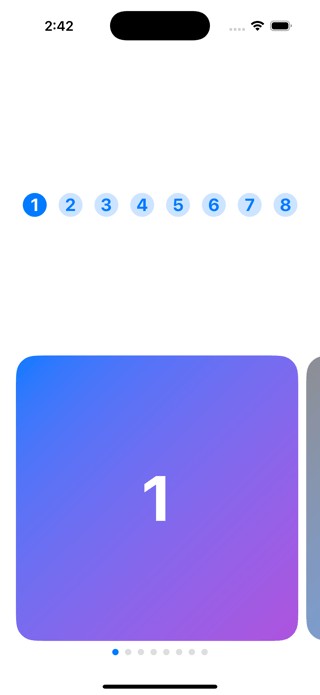
预期行为:
- 点击索引为N 的按钮应滚动到索引为N 的单元格
- 手动滚动到索引为N 的单元格应选中索引为N 的按钮
实际行为:
- 手动滚动工作正常——按钮选中状态与当前可见的单元格同步正确
-
按钮点击有问题:
-
点击按钮1(索引0)→ 滚动到单元格1 ✅
- 点击按钮2(索引1)→ 不发生滚动,但按钮2 被选中,右边能看到单元格2 的边缘
- 点击按钮3(索引2)→ 滚动到了单元格2(索引1),而不是单元格3(索引2)
以下是我的简化代码:
import SwiftUI

struct ContentView: View {
    let items = Array(1...8)
    @State private var selectedButtonsIndex: Int? = 0
    @State private var scrollPosition: Int? = 0

    var body: some View {
        VStack(spacing: 10) {
            // Buttons Collection
            LazyHStack(spacing: 15) {
                ForEach(Array(items.enumerated()), id: \.element) { index, item in
                    Button(action: {
                        withAnimation(.spring(response: 0.6, dampingFraction: 0.8)) {
                            selectedButtonsIndex = index
                        }
                    }) {
                        Text("\(item)")
                            .font(.title2.bold())
                            .foregroundColor(selectedButtonsIndex == index ? .white : .blue)
                            .frame(width: 30, height:30)
                            .background(
                                Circle()
                                    .fill(selectedButtonsIndex == index ? Color.blue : Color.blue.opacity(0.2))
                            )
                    }
                    .buttonStyle(PlainButtonStyle())
                }
            }
            .padding(.horizontal)
            // Cells Collection
            ScrollView(.horizontal) {
                LazyHStack(spacing: 10) {
                    ForEach(Array(items.enumerated()), id: \.element) { index, item in
                        CardView(number: item, isSelected: selectedButtonsIndex == index)
                            .containerRelativeFrame(.horizontal) { width, axis in
                                return width * 0.98
                            }
                            .id(index)
                            .onTapGesture {
                                withAnimation(.spring(response: 0.6, dampingFraction: 0.8)) {
                                    selectedButtonsIndex = index
                                }
                            }
                    }
                }
                .scrollTargetLayout()
            }
            .scrollTargetBehavior(.viewAligned)
            .safeAreaPadding(.horizontal, 20)
            .scrollPosition(id: $scrollPosition)
            .onChange(of: selectedButtonsIndex) { _, newValue in
                if let newIndex = newValue {
                    withAnimation(.spring(response: 0.65, dampingFraction: 0.82)) {
                        scrollPosition = newIndex
                    }
                }
            }
            .onChange(of: scrollPosition) { oldValue, newValue in
                if newValue != selectedButtonsIndex {
                    selectedButtonsIndex = newValue
                }
            }

            HStack {
                ForEach(0..<items.count, id: \.self) { index in
                    Circle()
                        .fill(index == selectedButtonsIndex ? Color.blue : Color.gray.opacity(0.3))
                        .frame(width: 8, height: 8)
                }
            }
        }
        .padding(.vertical)
    }
}

struct CardView: View {
    let number: Int
    let isSelected: Bool

    var body: some View {
        RoundedRectangle(cornerRadius: 25)
            .fill(
                LinearGradient(
                    colors: isSelected ? [.blue, .purple] : [.gray, .blue.opacity(0.7)],
                    startPoint: .topLeading,
                    endPoint: .bottomTrailing
                )
            )
            .overlay(
                Text("\(number)")
                    .font(.system(size: 80, weight: .bold))
                    .foregroundColor(.white)
            )
    }
}
解决方案
这个问题似乎是被滚动项的id引起的。你使用 selectedButtonsIndex 和 scrollPosition 各自维护独立的状态变量,并用 onChange 的处理程序在两者之间引发变化,这大概也没有帮助。
我建议的改动如下:
- 将
selectedButtonsIndex作为参数传给.scrollPosition,并移除.onChange修饰符。变量scrollPosition不再需要。 - 对于单元格集合,使用数组枚举的
offset作为id对ForEach的值,而不是element。这样就不需要对项应用.id。
// @State private var scrollPosition: Int? = 0
// Cells Collection
ScrollView(.horizontal) {
    HStack(spacing: 10) {
        ForEach(Array(items.enumerated()), id: \.offset) { index, item in
            CardView(number: item, isSelected: selectedButtonsIndex == index)
                .containerRelativeFrame(.horizontal) { width, axis in
                    return width * 0.98
                }
                .onTapGesture {
                    withAnimation(.spring(response: 0.6, dampingFraction: 0.8)) {
                        selectedButtonsIndex = index
                    }
                }
        }
    }
    .scrollTargetLayout()
}
.scrollTargetBehavior(.viewAligned)
.safeAreaPadding(.horizontal, 20)
.scrollPosition(id: $selectedButtonsIndex)
// .onChange deleted
顺便提一句,当你点击按钮滚动到某一项时,它并不是完全居中。原因是在 .containerRelativeFrame 闭包中把一个项的宽度设置为 width * 0.98。要解决,可以要么把闭包改为返回完整宽度,要么需要在 ScrollView 中给水平内容添加 .contentMargins。水平内容边距需要是 ScrollView 宽度的0.01,这是在扣除一个项的宽度后再除以2 得出的剩余部分。测量 ScrollView 宽度的一种方法是把它包裹在一个 GeometryReader 里。
此外,在项之间滚动时,你会注意到相邻项的位置有时会稍微“抖动”。回到第一项时尤其明显。这是因为容器是懒加载的。这个问题有时可以通过应用 .geometryGroup() 来解决(参阅 SwiftUI content jumping issue with LazyHStack embedded in a horizontal ScrollView in iOS 18),但实际在这里帮助并不大。然而,将 LazyHStack 改成 HStack 的确可以解决它。
站内所有文章版权归属LeftHeroAI导航站,无授权禁止任何主体转载、抄袭、复制内容,亦不得私自架设镜像站点。一经侵权,本站将通过法律途径追责。
相关文章






汇集全球数千款 AI 工具,每日持续更新,配套 AI 开发学习资源,轻松用 AI 提升工作效率。快捷键 Ctrl+D/⌘+D 一键收藏本站。