


Jetpack Compose:DropdownMenu在 Compose对话框中忽略锚点,直接出现在屏幕底部
我正在尝试实现一个自定义的 Jetpack Compose 对话框,其中包含两个带有各自锚定DropdownMenu的元素:
- 一个带向下箭头图标的标题行,单击时应触发一个菜单。
- 一个OutlinedTextField,输入超过3 个字符后应自动触发一个建议菜单。
问题: 尽管将每个元素都包裹在Box中以作为锚点,DropdownMenu仍然不会出现在相应元素的下方。相反,它似乎忽略了布局层级,在对话框的左上角(或屏幕)渲染。
我尝试过的做法:
- 将IconButton与 TextField分别包装在各自的Box容器中。
- 将DropdownMenu放在触发元素的同一父级中使用。
- 使用PopupProperties(focusable = false) 进行测试。
预期结果: 每个菜单都应在对话框的布局中锚定在各自的触发元素(图标或文本字段)上。
以下是我的源代码
@Composable
fun CustomComposeDialog(onDismiss: () -> Unit) {
    var textInput1 by remember { mutableStateOf("") }
    var textInput2 by remember { mutableStateOf("") }

    // Independent states for two different menus
    var headerMenuExpanded by remember { mutableStateOf(false) }
    val textFieldMenuExpanded = textInput1.length > 3

    Dialog(onDismissRequest = onDismiss) {
        // The container for the dialog content
        Surface(
            shape = RoundedCornerShape(16.dp),
            color = MaterialTheme.colorScheme.surface,
            modifier = Modifier.fillMaxWidth().padding(16.dp)
        ) {
            Column(
                modifier = Modifier.padding(20.dp),
                verticalArrangement = Arrangement.spacedBy(16.dp)
            ) {
                Text(
                    text = "Custom Entry",
                    style = MaterialTheme.typography.headlineSmall
                )

                // --- 1. Header with Icon & its Menu ---
                Box {
                    Row(
                        modifier = Modifier.fillMaxWidth(),
                        verticalAlignment = Alignment.CenterVertically,
                        horizontalArrangement = Arrangement.SpaceBetween
                    ) {
                        Text("Category Options")
                        IconButton(onClick = { headerMenuExpanded = true }) {
                            Icon(Icons.Default.ArrowDropDown, contentDescription = null)
                        }
                    }

                    DropdownMenu(
                        expanded = headerMenuExpanded,
                        onDismissRequest = { headerMenuExpanded = false }
                    ) {
                        DropdownMenuItem(text = { Text("Option A") }, onClick = { headerMenuExpanded = false })
                        DropdownMenuItem(text = { Text("Option B") }, onClick = { headerMenuExpanded = false })
                    }
                }

                // --- 2. First Text Field & its Anchored Menu ---
                Box {
                    OutlinedTextField(
                        value = textInput1,
                        onValueChange = { textInput1 = it },
                        label = { Text("Search or Type...") },
                        modifier = Modifier.fillMaxWidth()
                    )

                    // This menu anchors specifically to the TextField Box
                    DropdownMenu(
                        expanded = textFieldMenuExpanded,
                        onDismissRequest = { /* Controlled by text length */ },
                        // Focusable false allows the user to keep typing while menu is open
                        properties = androidx.compose.ui.window.PopupProperties(focusable = false)
                    ) {
                        val suggestions = listOf("Result 1", "Result 2", "Result 3")
                        suggestions.forEach { suggestion ->
                            DropdownMenuItem(
                                text = { Text(suggestion) },
                                onClick = {
                                    textInput1 = suggestion
                                    // Note: In a real app, you'd reset a flag here to hide it
                                }
                            )
                        }
                    }
                }

                // --- 3. Second Text Field ---
                OutlinedTextField(
                    value = textInput2,
                    onValueChange = { textInput2 = it },
                    label = { Text("Additional Notes") },
                    modifier = Modifier.fillMaxWidth()
                )

                // Close Button
                TextButton(
                    onClick = onDismiss,
                    modifier = Modifier.align(Alignment.End)
                ) {
                    Text("Close")
                }
            }
        }
    }
}
以下是我的当前结果!
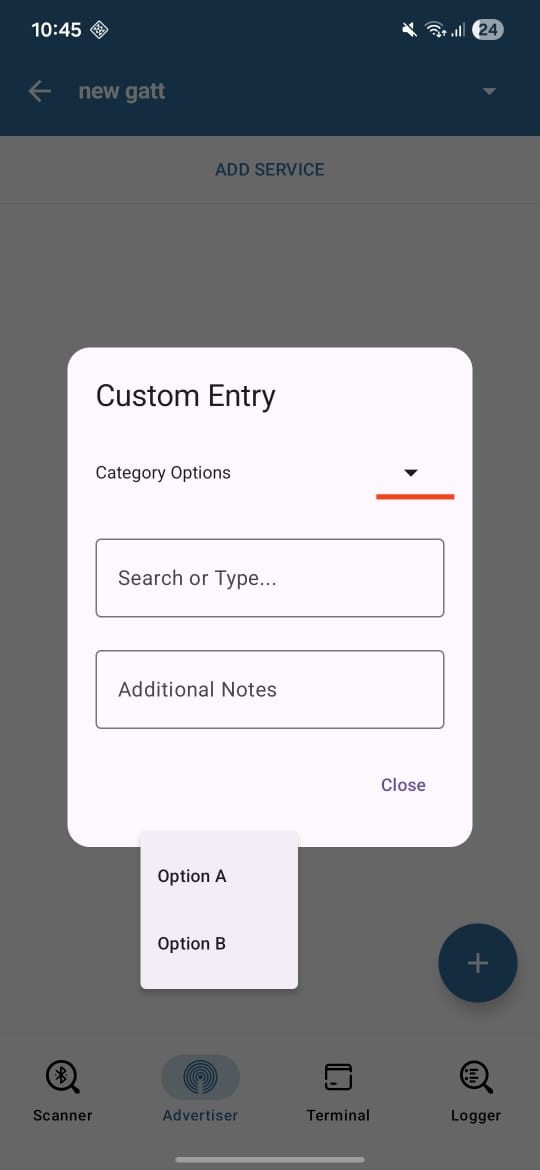
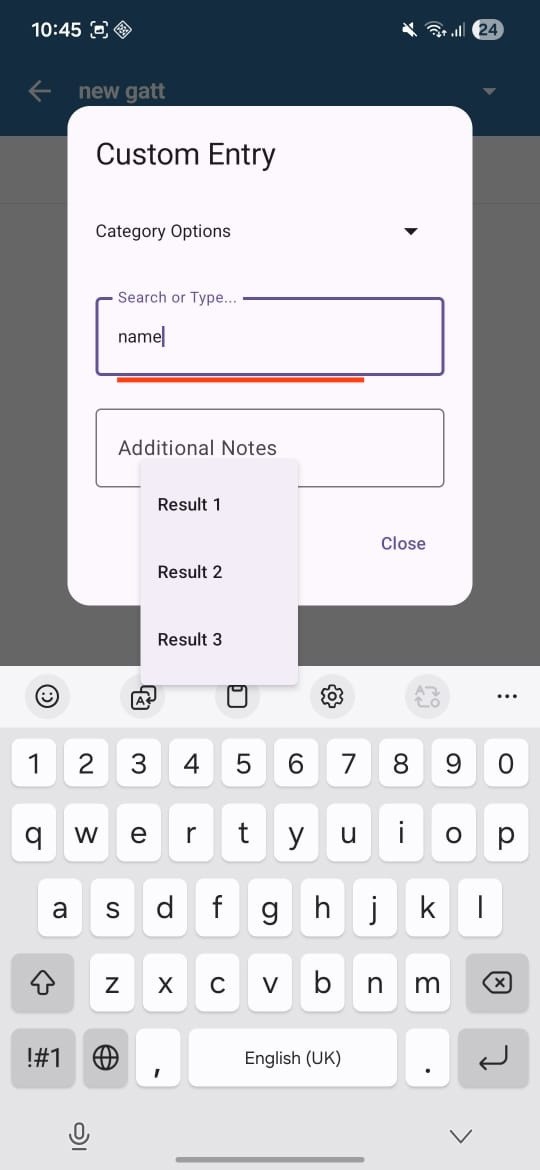
解决方案
选项 (1) — 针对TextField下拉
用以下内容替换你的TextField + DropdownMenu:
@OptIn(ExperimentalMaterial3Api::class)
ExposedDropdownMenuBox(
    expanded = textFieldMenuExpanded,
    onExpandedChange = { }
) {
    OutlinedTextField(
        value = textInput1,
        onValueChange = { textInput1 = it },
        label = { Text("Search or Type...") },
        modifier = Modifier
            .fillMaxWidth()
            .menuAnchor() // 🔥 IMPORTANT
    )

    ExposedDropdownMenu(
        expanded = textFieldMenuExpanded,
        onDismissRequest = { }
    ) {
        val suggestions = listOf("Result 1", "Result 2", "Result 3")
        suggestions.forEach {
            DropdownMenuItem(
                text = { Text(it) },
                onClick = { textInput1 = it }
            )
        }
    }
}
选项 (2) — 针对Header下拉(手动锚点)
对于标题行,DropdownMenu 在对话框中并不能很好地自动锚定。
var headerExpanded by remember { mutableStateOf(false) }

Box {
    Row(
        modifier = Modifier
            .fillMaxWidth()
            .clickable { headerExpanded = true },
        horizontalArrangement = Arrangement.SpaceBetween,
        verticalAlignment = Alignment.CenterVertically
    ) {
        Text("Category Options")
        Icon(Icons.Default.ArrowDropDown, null)
    }

    DropdownMenu(
        expanded = headerExpanded,
        onDismissRequest = { headerExpanded = false },
        modifier = Modifier.align(Alignment.TopEnd) // 🔥 force anchor
    ) {
        DropdownMenuItem(
            text = { Text("Option A") },
            onClick = { headerExpanded = false }
        )
        DropdownMenuItem(
            text = { Text("Option B") },
            onClick = { headerExpanded = false }
        )
    }
}
如果你仍然看到错位:
Add this:
Dialog(
    onDismissRequest = onDismiss,
    properties = DialogProperties(usePlatformDefaultWidth = false)
)
站内所有文章版权归属LeftHeroAI导航站,无授权禁止任何主体转载、抄袭、复制内容,亦不得私自架设镜像站点。一经侵权,本站将通过法律途径追责。
相关文章






汇集全球数千款 AI 工具,每日持续更新,配套 AI 开发学习资源,轻松用 AI 提升工作效率。快捷键 Ctrl+D/⌘+D 一键收藏本站。