


Expo EAS构建Android APK文件
我对Expo和 React Native还挺陌生的。我有一个为iOS和 Android编写的应用,想把它部署到Expo上,以便在外部手机上安装进行测试。
我是在Windows 11机器上运行构建命令。
我已经通过以下命令部署了iOS版本:
eas build --platform ios --profile preview
这里出现了一个问题,提示.xcode.env文件的编码不正确。把该文件改成正确的Linux编码后就修复了错误,现在我已经能够部署到Expo并在iPhone上安装。
我正在尝试对Android使用同样的方式,命令为:
eas build --platform android --profile preview
在这里,构建在 Run gradlew 步骤失败,具体错误如下:
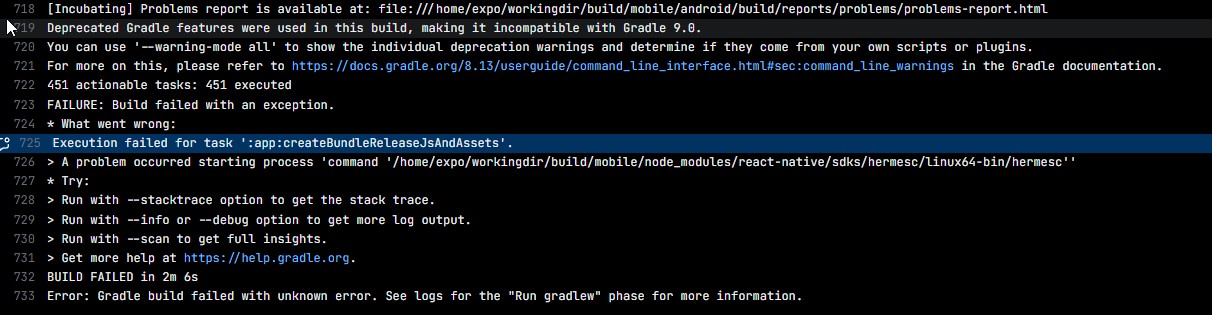
我尝试使用 clear-cache 参数运行此命令,希望能对 node_modules 进行一次全新安装。
以下是我的 eas.json 文件:
{
  "cli": {
    "version": ">= 16.19.2",
    "appVersionSource": "remote"
  },
  "build": {
    "development": {
      "developmentClient": true,
      "distribution": "internal"
    },
    "preview": {
      "distribution": "internal",
      "android": {
        "buildType": "apk",
        "gradleCommand": ":app:assembleRelease"
      }
    },
    "production": {
      "autoIncrement": true
    }
  },
  "submit": {
    "production": {}
  }
}
应要求,以下是我的 package.json 文件
{
  "name": "mobile",
  "main": "index.js",
  "version": "1.0.0",
  "scripts": {
    "start": "expo start --dev-client",
    "android": "expo run:android",
    "ios": "expo run:ios",
    "web": "expo start --web",
    "test": "jest --watchAll"
  },
  "jest": {
    "preset": "jest-expo"
  },
  "dependencies": {
    "@babel/runtime": "^7.28.4",
    "@expo/vector-icons": "^15.0.2",
    "@react-native-community/datetimepicker": "8.6.0",
    "@react-native-picker/picker": "2.11.4",
    "@react-native-voice/voice": "^3.1.5",
    "@react-navigation/drawer": "^7.3.9",
    "@react-navigation/native": "^7.1.6",
    "atob": "^2.1.2",
    "axios": "^1.12.2",
    "core-js": "^3.45.1",
    "expo": "55",
    "expo-auth-session": "~55.0.12",
    "expo-crypto": "~55.0.12",
    "expo-dev-client": "~55.0.22",
    "expo-font": "~55.0.6",
    "expo-linking": "~55.0.11",
    "expo-location": "~55.1.6",
    "expo-router": "~55.0.10",
    "expo-secure-store": "~55.0.11",
    "expo-splash-screen": "~55.0.15",
    "expo-status-bar": "~55.0.5",
    "expo-system-ui": "~55.0.13",
    "expo-task-manager": "~55.0.12",
    "expo-web-browser": "~55.0.12",
    "hermes-compiler": "^250829098.0.2",
    "jwt-decode": "^4.0.0",
    "react": "19.2.0",
    "react-dom": "19.2.0",
    "react-native": "0.83.4",
    "react-native-gesture-handler": "~2.30.0",
    "react-native-modal-datetime-picker": "^18.0.0",
    "react-native-reanimated": "4.2.1",
    "react-native-safe-area-context": "~5.6.2",
    "react-native-screens": "~4.23.0",
    "react-native-toast-message": "^2.3.3",
    "react-native-web": "^0.21.0",
    "react-native-worklets": "0.7.2",
    "semver": "^7.7.2",
    "sharp": "^0.34.4"
  },
  "devDependencies": {
    "@babel/core": "^7.28.4",
    "@babel/plugin-transform-runtime": "^7.28.3",
    "@react-native-community/cli": "latest",
    "@types/react-native": "^0.72.8",
    "dotenv": "^16.6.1",
    "jest": "^29.7.0",
    "jest-expo": "~55.0.13",
    "react-test-renderer": "19.0.0",
    "typescript": "~5.9.2"
  },
  "private": true
}
解决方案
正如前面的评论所提到的,问题在于新版Expo和 React Native中,hermesc的可执行文件不在默认位置,而是在node_modules/hermes-compiler下,因此我需要更新build.gradle和 gradle.properties文件。
大致如下:
android/app/build.gradle
hermesCommand = new File(["node", "--print", "require.resolve('hermes-compiler/package.json')"].execute(null, rootDir).text.trim()).getParentFile().getAbsolutePath() + "/hermesc/%OS-BIN%/hermesc"
android/gradle.properties
hermesCommand=../node_modules/hermes-compiler/hermesc/%OS-BIN%/hermesc
后来还出现了很多其他错误,这些是由于某些react-native包的版本不匹配所致。一旦这些问题修复,构建通过,我也能够安装应用。
不过,一打开应用就会直接崩溃。这是另一个问题,我现在正在调查,但上面的说明已经解决了我最初的问题。
站内所有文章版权归属LeftHeroAI导航站,无授权禁止任何主体转载、抄袭、复制内容,亦不得私自架设镜像站点。一经侵权,本站将通过法律途径追责。
相关文章






汇集全球数千款 AI 工具,每日持续更新,配套 AI 开发学习资源,轻松用 AI 提升工作效率。快捷键 Ctrl+D/⌘+D 一键收藏本站。