


iOS 26的弹出视图显示错误的系统颜色,且在用户切换明暗模式时不会随之改变
正如标题所示,iOS 26的弹出窗(popovers)显示的系统颜色有误,且在用户切换明暗模式时颜色不改变。这与之前的系统(例如iOS 18)的表现形成鲜明对比,后者表现正确。我很惊讶,似乎没有人指出这一点。
为了说明问题,下面是一个极其简单的应用:
class ViewController: UIViewController {
    @IBAction func doButton(_ sender: UIButton) {
        let popover = ViewController2()
        popover.modalPresentationStyle = .popover
        if let presenter = popover.popoverPresentationController {
            presenter.sourceItem = sender
            presenter.delegate = self
        }
        present(popover, animated: true)
    }
}

extension ViewController: UIPopoverPresentationControllerDelegate {
    func adaptivePresentationStyle(for controller: UIPresentationController) -> UIModalPresentationStyle {
        .none
    }
}

class ViewController2: UIViewController {
    override func viewDidLoad() {
        super.viewDidLoad()
        view.backgroundColor = .systemBackground
        let label = UILabel()
        label.text = "Label"
        label.backgroundColor = .systemBackground
        view.addSubview(label)
        label.translatesAutoresizingMaskIntoConstraints = false
        label.centerXAnchor.constraint(equalTo: view.centerXAnchor).isActive = true
        label.centerYAnchor.constraint(equalTo: view.centerYAnchor).isActive = true
    }
}
运行应用并点击按钮以显示弹出窗。弹出窗中的标签看起来是这样的:
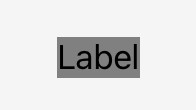
好吧,这真是错得离谱。标签的背景颜色是 .systemBackground,标签背后的弹出窗视图的颜色是 .systemBackground;它们在明亮模式下本应完全相同,也就是基本上是白色。然而,标签的背景看起来基本接近黑色。
(请注意,.systemBackground 不是唯一会出现此问题的颜色;你可以在名称中包含 .system 的任意动态颜色上看到同样的问题。)
此外,在弹出窗显示时,将设备/模拟器从明亮模式切换到暗黑模式。我本以为弹出窗的整个背景会变暗,但它一点也不改变!不过,如果你关闭弹出窗再重新显示,它确实是暗黑的。因此,它能在弹出时识别当前的明暗模式,但对模式的变化没有响应。
确实,如果在弹出窗的 viewDidLoad 中调用 registerForTraitChanges([UITraitUserInterfaceStyle.self]),你会发现我们的动作方法永远不会被调用。弹出窗根本没有接收到明暗模式trait的变化信息!
人们应如何应对这个问题?
解决方案
Here's a workaround.
First, since the popover is not receiving trait change information, we will just send it that information ourselves, manually, from the main view controller:
class ViewController: UIViewController {
    weak var popover: UIViewController?

    override func viewDidLoad() {
        super.viewDidLoad()
        registerForTraitChanges([UITraitUserInterfaceStyle.self], target: self, action: #selector(traitChanged))
    }

    @objc func traitChanged() {
        popover?.traitOverrides.userInterfaceStyle = traitCollection.userInterfaceStyle
    }

    @IBAction func doButton(_ sender: UIButton) {
        let popover = ViewController2()
        // ...
        self.popover = popover
    }
That takes care of the trait change problem; the popover now responds live to the user toggling light/dark mode.
But what about the background color of that label? Hold on to your hat, you're not going to believe this one. First, we will make our own color which happens to look and behave exactly like the desired system color:
extension UIColor {
    static var myBackground: UIColor = .init  { traits in
        return UIColor.systemBackground.resolvedColor(with: traits)
    }
}
Now we'll set the background of the popover to that color:
class ViewController2: UIViewController {
    override func viewDidLoad() {
        super.viewDidLoad()
        view.backgroundColor = .myBackground
        let label = UILabel()
        // ...
Incredibly, this "solves" the whole problem. You may ask: why does changing the background color of the main view change the background color of the label? I have no idea, but I have to guess that what this shows is that popover system colors are wrong because of something about their interaction with the color behind them, whatever it may be.
相关文章





