


Swift - 执行批量更新
我注意到,当我更新表格单元格的大小时,下面的单元格有时似乎会消失。你能告诉我该如何修复吗?这是一个此类布局的示例。这种行为有时会在很长一段时间内不被注意到,有时几乎一直存在。我曾以为这与单元格有关,因此尽量把问题简化到最简单的情况,但即便在这种情况下,你仍然可以观察到这种行为。可能的原因是什么?
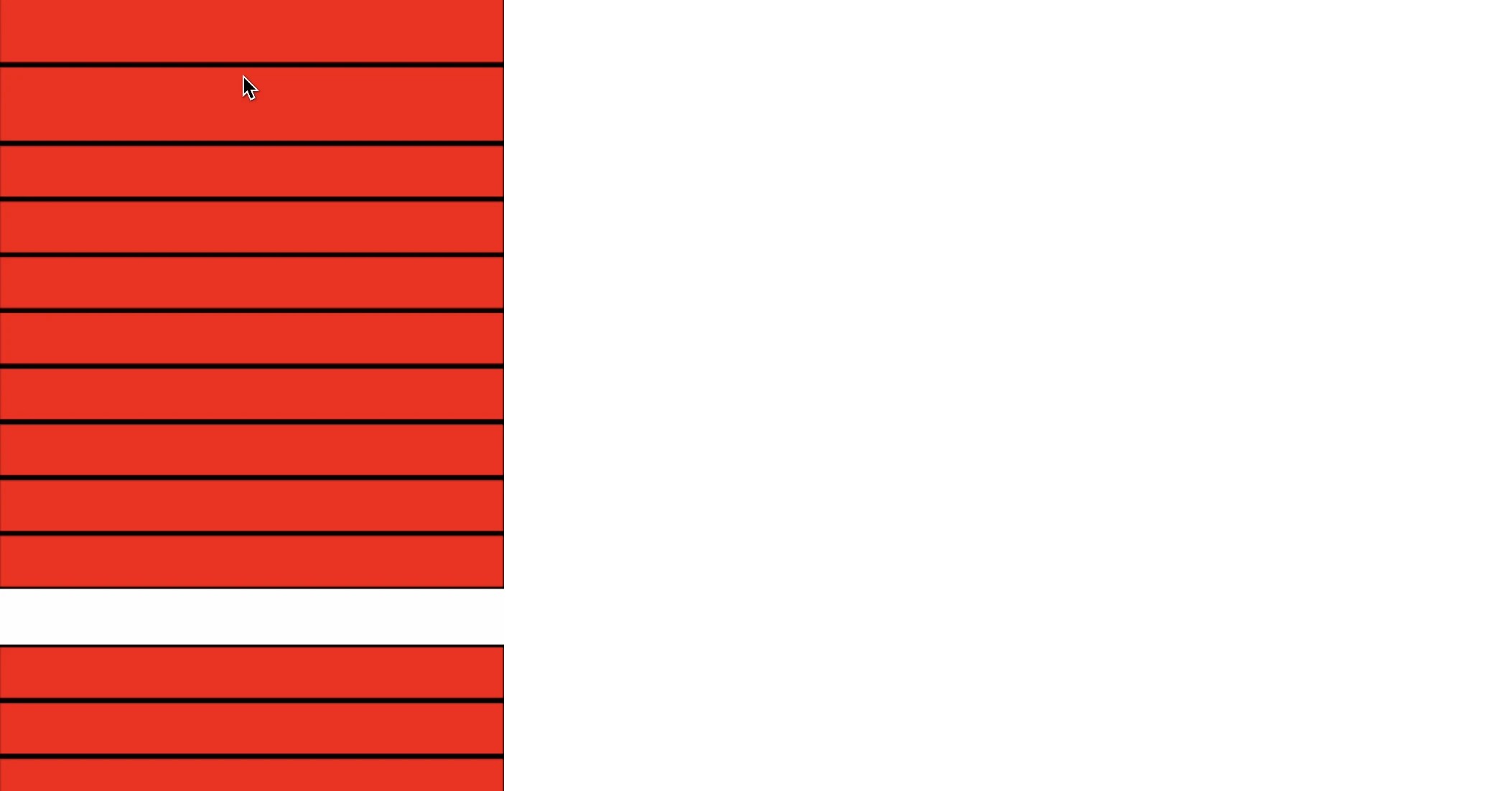
class ViewController: UIViewController {

    private var items: [String] = ["","","","","","","","","","","","","","","","","","","","","","","","","","","","","","","","","","","","","","","","","","","","","","","","","","","","","","","","","","",""]

    private lazy var tableView: UITableView = {
        let t = UITableView(frame: .zero, style: .plain)
        t.backgroundColor = .clear
        t.separatorStyle = .none
        t.estimatedRowHeight = 220
        t.dataSource = self
        t.delegate = self
        t.register(ProductInfoAttributesCell.self, forCellReuseIdentifier: ProductInfoAttributesCell.reuseIdentifier)
        return t
    }()

    private var selectedIndex: [Int] = []

    override func viewDidLoad() {
        super.viewDidLoad()
        view.backgroundColor = .white

        view.addSubview(tableView)
        tableView.snp.makeConstraints { make in
            make.edges.equalTo(view.safeAreaLayoutGuide)
        }
    }

    func tableView(_ tableView: UITableView, heightForRowAt indexPath: IndexPath) -> CGFloat {
        if selectedIndex.contains(indexPath.row)
        {
            return 200
        } else {
            return 40
        }
    }
}

extension ViewController: UITableViewDataSource, UITableViewDelegate {
    func tableView(_ tableView: UITableView, numberOfRowsInSection section: Int) -> Int {
        items.count
    }

    func tableView(_ tableView: UITableView, cellForRowAt indexPath: IndexPath) -> UITableViewCell {
        let cell = tableView.dequeueReusableCell(
            withIdentifier: ProductInfoAttributesCell.reuseIdentifier,
            for: indexPath
        ) as! ProductInfoAttributesCell

        cell.onButtonTap = { [weak self] in
            self?.selectedIndex.append(indexPath.row)
            self?.tableView.performBatchUpdates(nil)
        }

        return cell
    }
}
// MARK: - ProductInfoAttributesCell
final class ProductInfoAttributesCell: UITableViewCell {

    static let reuseIdentifier = "AccordionTableViewCell"

    var onButtonTap: (() -> Void)?


    let newContainerViewheight = 40
    let newContainerViewheightMax = 90
    let moreButtonheight = 20

    // MARK: - Init

    override init(style: UITableViewCell.CellStyle, reuseIdentifier: String?) {
        super.init(style: style, reuseIdentifier: reuseIdentifier)
        setupLayout()
    }

    @available(*, unavailable)
    required init?(coder aDecoder: NSCoder) {
        fatalError("init(coder:) has not been implemented")
    }

    // MARK: Setup And Configuration

    private func setupLayout() {
        contentView.clipsToBounds = true
        contentView.backgroundColor = .red
        contentView.layer.borderWidth = 2
        contentView.layer.borderColor = UIColor.black.cgColor
        let tap = UITapGestureRecognizer(target: self, action: #selector(headerContainerViewTapped))
        contentView.addGestureRecognizer(tap)
    }

    @objc private func headerContainerViewTapped() {
        onButtonTap?()
    }

}
解决方案
问题在于你的单元格没有真正的高度。你实现了 tableView:heightForRowAt:,但这并不对应任何现实。你已经承诺要实现自适应大小的单元格——这就是设置 t.estimatedRowHeight 的含义——但随后你没有兑现承诺:你的单元格并非自适应大小。
要实现自适应大小,你的单元格至少需要一个高度约束。这正是你的代码中缺失的。你还应移除对 heightForRowAt 的实现,完全依赖约束来确定单元格的大小。
站内所有文章版权归属LeftHeroAI导航站,无授权禁止任何主体转载、抄袭、复制内容,亦不得私自架设镜像站点。一经侵权,本站将通过法律途径追责。
相关文章






汇集全球数千款 AI 工具,每日持续更新,配套 AI 开发学习资源,轻松用 AI 提升工作效率。快捷键 Ctrl+D/⌘+D 一键收藏本站。