


Expo SDK 53在通过Azure包(名为“Apple App Store Release”)部署到iOS时,导致msauth失效
在将我们的Expo React Native应用通过 Apple App Store Release 包部署到苹果应用商店时,遇到了以下错误:
Error: [ContentDelivery.Uploader.600003C88200] Validation failed (409) The following URL schemes found in your app are disallowed: [msauth] (ID: <uuid>)
我已经阅读了关于在.plist文件中把 CFBundleURLSchemes 键的值设为 msauth.<my.bundle.id> 的多种解答。我对任何我可能遗漏的配置设置都欢迎建议...
.plist文件
<?xml version="1.0" encoding="UTF-8" ?>
<!DOCTYPE plist PUBLIC "-//Apple//DTD PLIST 1.0//EN"
  "http://www.apple.com/DTDs/PropertyList-1.0.dtd">
<plist version="1.0">
  <dict>
    <key>method</key>
    <string>app-store</string>
    <key>teamID</key>
    <string>TEAM_ID</string>
    <key>signingCertificate</key>
    <string>iPhone Distribution</string>
    <key>uploadBitcode</key>
    <false/>
    <key>CFBundleURLTypes</key>
    <array>
      <dict>
        <key>CFBundleURLSchemes</key>
        <array>
          <string>msauth.com.company.projectname</string>
        </array>
      </dict>
    </array>
    <key>provisioningProfiles</key>
    <dict>
      <key>com.company.projectname.appname</key>
      <string>UUID</string>
    </dict>
  </dict>
</plist>
Expo的 app.config.js文件
module.exports = {
  name: Demo,
  slug: demo,
  version: "1.0.0",
  scheme: 'msauth',
  orientation: 'portrait',
  icon: './assets/images/appname/ios-icon-1024x1024.png',
  userInterfaceStyle: 'light',
  newArchEnabled: true,
  backgroundColor: '#202c5d',
  assetBundlePatterns: ['**/*'],
  ios: {
    icon: {
      backgroundColor: '#202c5d'
    },
    infoPlist: {
      NSCameraUsageDescription: 'Your camera will be used to scan barcodes or take pictures for Demo',
      NSLocationWhenInUseUsageDescription: 'Your locations information will be used whenever you access the inventory.'
    },
    supportsTablet: true,
    googleServicesFile: './GoogleService-Info.plist',
    bundleIdentifier: 'com.company.projectname.appname',
    buildNumber: '1.0.0'
  },
  android: {
    adaptiveIcon: {
      foregroundImage: './assets/images/appname/android-icon-1024x1024.png',
      backgroundColor: '#255d98'
    },
    googleServicesFile: './google-services.json',
    edgeToEdgeEnabled: true,
    package: 'com.company.projectname.appname',
    versionCode: 1
  },
  web: {
    favicon: './assets/images/favicon.png'
  },
  plugins: [
    ['./plugins/withNinjaLongPaths'],
    ['@react-native-firebase/app'],
    ['@react-native-firebase/auth'],
    ['@react-native-firebase/crashlytics'],
    [
      'expo-build-properties',
      {
        android: {
          minSdkVersion: 26,
          compileSdkVersion: 35,
          targetSdkVersion: 35
        },
        ios: {
          useFrameworks: 'static'
        }
      }
    ],
    [
      'expo-image-picker',
      {
        photosPermission: 'Allow $(PRODUCT_NAME) to access your photos',
        cameraPermissions: 'Allow $(PRODUCT_NAME) to access your camera'
      }
    ],
    [
      'expo-location',
      {
        locationAlwaysAndWhenInUsePermission: 'Allow $(PRODUCT_NAME) to use your location.'
      }
    ],
    [
      'expo-splash-screen',
      {
        ios: {
          backgroundColor: '#202c5d',
          image: './assets/images/appname/splash-1024x1024.png',
          imageWidth: 200
        },
        android: {
          backgroundColor: '#202c5d',
          image: './assets/images/appname/splash-1024x1024.png',
          imageWidth: 200
        }
      }
    ]
  ]
};
以下是一些Azure DevOps流水线的截图以便参考
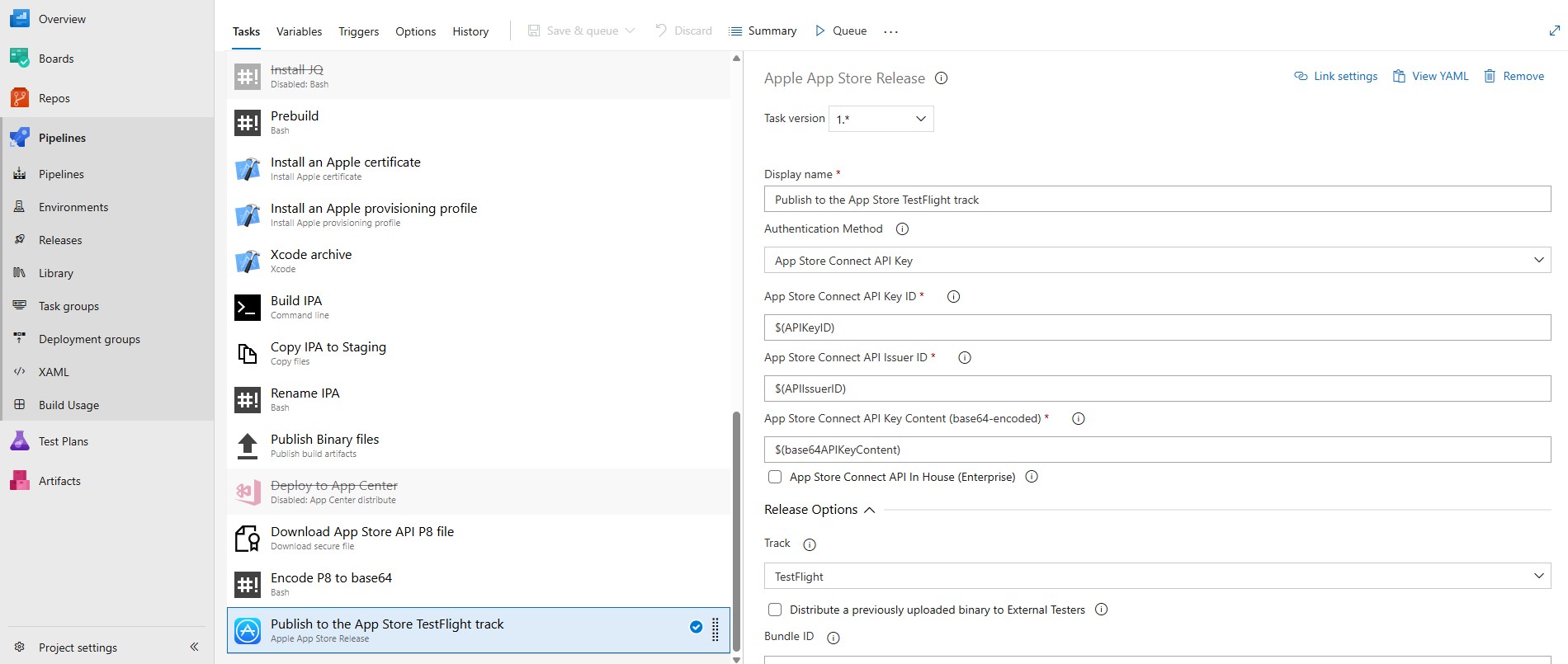
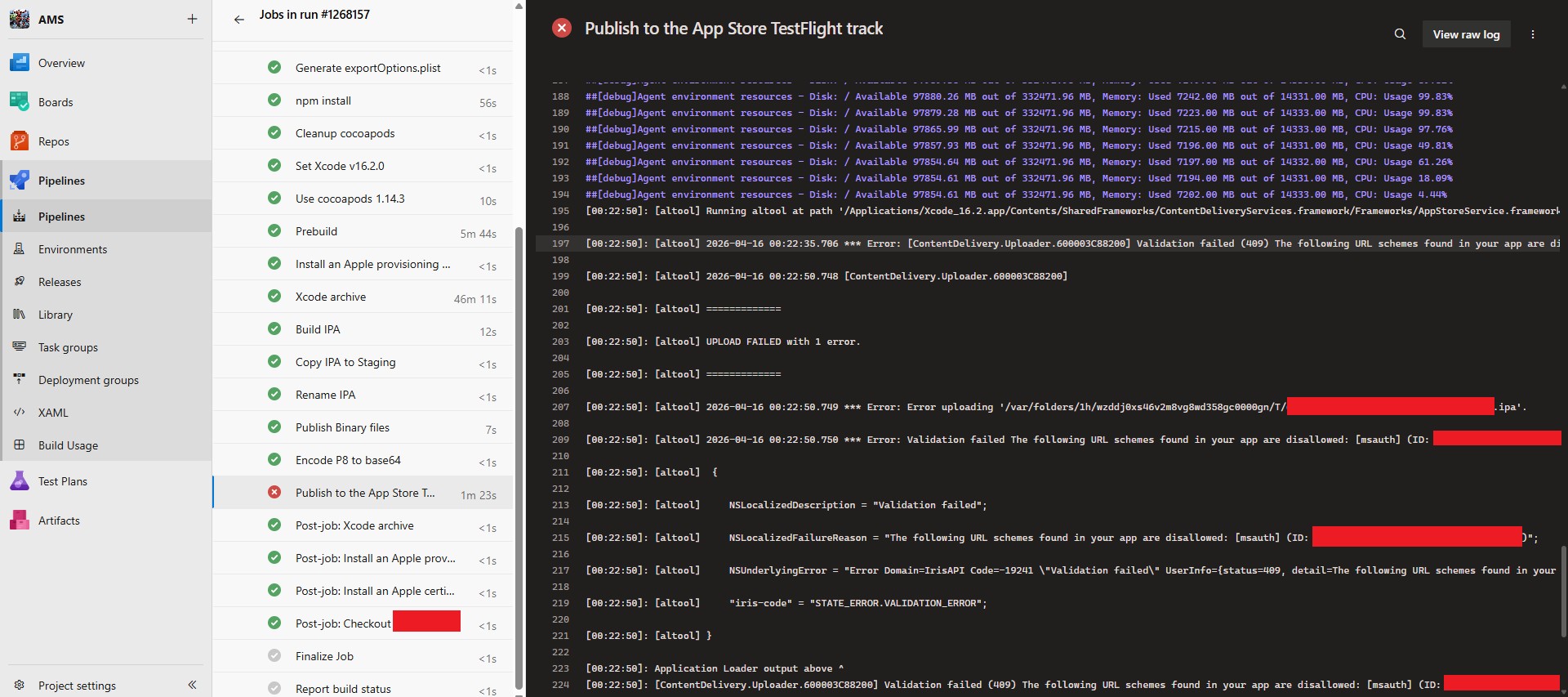
注意:我们可以顺利部署到Firebase和 Google Play商店,但App Store一直拒绝我们的应用。
如需其他信息,请在下方留言,我会编辑本问题。谢谢。
解决方案
两处改动解决了这个问题
1.移除plist文件中的CFBundleURLTypes部分
<key>CFBundleURLTypes</key>
<array>
  <dict>
    <key>CFBundleURLSchemes</key>
    <array>
      <string>$(PLIST_CF_BULNDLE_URL_SCHEMES_0)</string>
    </array>
  </dict>
</array>
2.将 ios.infoPlist.CFBundleURLSchemes 与 ios.infoPlist.LSApplicationQueriesSchemes 添加到Expo的 app.config.js文件中
      CFBundleURLTypes: [
        {
          CFBundleURLSchemes: ['msauth.com.company.projectname']
        }
      ],
      LSApplicationQueriesSchemes: ['msauth', 'msauthv2', 'msauthv3']
变更后的文件内容...
.plist文件
<?xml version="1.0" encoding="UTF-8" ?>
<!DOCTYPE plist PUBLIC "-//Apple//DTD PLIST 1.0//EN"
  "http://www.apple.com/DTDs/PropertyList-1.0.dtd">
<plist version="1.0">
  <dict>
    <key>method</key>
    <string>app-store</string>
    <key>teamID</key>
    <string>TEAM_ID</string>
    <key>signingCertificate</key>
    <string>iPhone Distribution</string>
    <key>uploadBitcode</key>
    <false/>
    <key>provisioningProfiles</key>
    <dict>
      <key>com.company.projectname.appname</key>
      <string>UUID</string>
    </dict>
  </dict>
</plist>
Expo的 app.config.js文件
module.exports = {
  name: Demo,
  slug: demo,
  version: "1.0.0",
  scheme: 'msauth',
  orientation: 'portrait',
  icon: './assets/images/appname/ios-icon-1024x1024.png',
  userInterfaceStyle: 'light',
  newArchEnabled: true,
  backgroundColor: '#202c5d',
  assetBundlePatterns: ['**/*'],
  ios: {
    icon: {
      backgroundColor: '#202c5d'
    },
    infoPlist: {
      NSCameraUsageDescription: 'Your camera will be used to scan barcodes or take pictures for Demo',
      NSLocationWhenInUseUsageDescription: 'Your locations information will be used whenever you access the inventory.',
      CFBundleURLTypes: [
        {
          CFBundleURLSchemes: ['msauth.com.company.projectname']
        }
      ],
      LSApplicationQueriesSchemes: ['msauth', 'msauthv2', 'msauthv3']
    },
    supportsTablet: true,
    googleServicesFile: './GoogleService-Info.plist',
    bundleIdentifier: 'com.company.projectname.appname',
    buildNumber: '1.0.0'
  },
  android: {
    adaptiveIcon: {
      foregroundImage: './assets/images/appname/android-icon-1024x1024.png',
      backgroundColor: '#255d98'
    },
    googleServicesFile: './google-services.json',
    edgeToEdgeEnabled: true,
    package: 'com.company.projectname.appname',
    versionCode: 1
  },
  web: {
    favicon: './assets/images/favicon.png'
  },
  plugins: [
    ['./plugins/withNinjaLongPaths'],
    ['@react-native-firebase/app'],
    ['@react-native-firebase/auth'],
    ['@react-native-firebase/crashlytics'],
    [
      'expo-build-properties',
      {
        android: {
          minSdkVersion: 26,
          compileSdkVersion: 35,
          targetSdkVersion: 35
        },
        ios: {
          useFrameworks: 'static'
        }
      }
    ],
    [
      'expo-image-picker',
      {
        photosPermission: 'Allow $(PRODUCT_NAME) to access your photos',
        cameraPermissions: 'Allow $(PRODUCT_NAME) to access your camera'
      }
    ],
    [
      'expo-location',
      {
        locationAlwaysAndWhenInUsePermission: 'Allow $(PRODUCT_NAME) to use your location.'
      }
    ],
    [
      'expo-splash-screen',
      {
        ios: {
          backgroundColor: '#202c5d',
          image: './assets/images/appname/splash-1024x1024.png',
          imageWidth: 200
        },
        android: {
          backgroundColor: '#202c5d',
          image: './assets/images/appname/splash-1024x1024.png',
          imageWidth: 200
        }
      }
    ]
  ]
};
站内所有文章版权归属LeftHeroAI导航站,无授权禁止任何主体转载、抄袭、复制内容,亦不得私自架设镜像站点。一经侵权,本站将通过法律途径追责。
相关文章






汇集全球数千款 AI 工具,每日持续更新,配套 AI 开发学习资源,轻松用 AI 提升工作效率。快捷键 Ctrl+D/⌘+D 一键收藏本站。