


VSCode在按Ctrl+Space弹出的IntelliSense面板中导航时,总是会跳到第一条建议
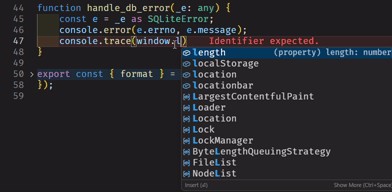
正如你所看到的,我正在尝试通过导航定位到 window.location.href,但每次向下导航时,它都会自动跳转到第一个建议。这在我按下Ctrl+Space显示该函数实现的注释时尤其烦人,因为我看不太快。如果我在某个建议处停止导航,它也会自行往上跳,另外我尝试把光标移开,但似乎没有区别。
这里是我的 settings.json,供有兴趣的人查看
{
    // editor settings
    "editor.colorDecoratorsActivatedOn": "click",
    "editor.insertSpaces": false,
    "editor.autoClosingBrackets": "always",
    "editor.autoClosingComments": "always",
    "editor.autoClosingQuotes": "always",
    "editor.autoIndent": "advanced",
    // "editor.codeLens": true,
    "editor.smoothScrolling": true,
    "editor.folding": true,
    "editor.glyphMargin": true,
    "editor.hover.sticky": true,
    "editor.hover.above": false,
    "editor.lineHeight": 1.2,
    "editor.formatOnType": true,
    "editor.fontLigatures": true,
    "editor.wordWrap": "on",
    "editor.fontFamily": "Fira Code",
    "editor.fontSize": 18,
    "editor.minimap.autohide": "mouseover",
    "editor.minimap.scale": 3,
    "editor.minimap.maxColumn": 150,
    "editor.minimap.size": "fill",
    "editor.formatOnPaste": true,
    "editor.bracketPairColorization.independentColorPoolPerBracketType": true,
    "editor.minimap.renderCharacters": false,
    "editor.experimentalWhitespaceRendering": "off",
    "editor.renderWhitespace": "trailing",
    "editor.indentSize": "tabSize",
    "editor.suggest.showStatusBar": true,
    "clang-format.executable": "clang-format",
    // terminal
    "terminal.integrated.profiles.windows": {
        "Git Bash": {
            "source": "Git Bash"
        },
        "PowerShell": {
            "source": "PowerShell",
            "icon": "terminal-powershell"
        },
        "Command Prompt": {
            "path": [
                "${env:windir}//Sysnative//cmd.exe",
                "${env:windir}//System32//cmd.exe"
            ],
            "args": [],
            "icon": "terminal-cmd"
        },
    },
    //
    "terminal.integrated.defaultProfile.windows": "Git Bash",
    "terminal.integrated.fontFamily": "Fira Code",
    "terminal.integrated.tabs.location": "right",
    "terminal.integrated.cursorStyle": "line",
    "terminal.integrated.shellIntegration.enabled": true,
    "terminal.integrated.tabs.defaultIcon": "debug-continue",
    "terminal.integrated.scrollback": 100000,
    "terminal.integrated.persistentSessionScrollback": 10000,
    // files
    "files.autoSave": "afterDelay",
    "files.trimFinalNewlines": true,
    "files.insertFinalNewline": true,
    "files.autoSaveWhenNoErrors": true,
    "files.trimTrailingWhitespace": true,
    "files.associations": {
        ".env": "dotenv"
    },
    // workbench
    "workbench.sideBar.location": "right",
    "workbench.editor.showTabs": "single",
    "workbench.editor.closeOnFileDelete": true,
    "workbench.colorCustomizations": {},
    "workbench.colorTheme": "Dark+",
    // rest of editor settings
    "zenMode.centerLayout": false,
    "zenMode.showTabs": "single",
    "zenMode.hideStatusBar": false,
    "zenMode.hideLineNumbers": false,
    "zenMode.hideActivityBar": false,
    "debug.console.fontFamily": "Fira Code",
    "chat.editor.fontFamily": "Fira Code",
    "diffEditor.hideUnchangedRegions.enabled": false,
    //
    // Langs
    "[jsonc]": {
        "editor.defaultFormatter": "vscode.json-language-features"
    },
    "[typescript]": {
        "editor.defaultFormatter": "vscode.typescript-language-features"
    },
    "js/ts.preferences.preferTypeOnlyAutoImports": true,
    "[cpp]": {
        "editor.defaultFormatter": "ms-vscode.cpptools"
    },
    "[json]": {
        "editor.defaultFormatter": "esbenp.prettier-vscode"
    },
    "[shellscript]": {
        "editor.defaultFormatter": "foxundermoon.shell-format"
    },
    "[javascript]": {
        "editor.defaultFormatter": "vscode.typescript-language-features"
    },
    "js/ts.updateImportsOnFileMove.enabled": "always",
    //
    // extensions
    "cSpell.userWords": [
        "autoincrement",
        "BSON",
        "Charestisitcs",
        "cloudinary",
        "cout",
        "Cryptr",
        "DATETIME",
        "ecommerce",
        "elysia",
        "elysiajs",
        "Encrypter",
        "esbenp",
        "Fira",
        "Firestore",
        "fkey",
        "hono",
        "Maher",
        "maxlength",
        "nodenext",
        "psql",
        "signup",
        "Swal",
        "sweetalert",
        "tailwindcss",
        "tauri",
        "todos",
        "tsvector",
        "typebox",
        "virtuals"
    ],
    "errorLens.lintFilePaths": {
        "eslint": [
            "**/*.eslintrc.{js,cjs,yaml,yml,json}",
            "**/*package.json"
        ],
        "Stylelint": [
            "**/*.stylelintrc",
            "**/*.stylelintrc.{cjs,js,json,yaml,yml}",
            "**/*stylelint.config.{cjs,js}",
            "**/*package.json"
        ]
    },
    "quokka.showOutputOnStart": false,
    "svelte.enable-ts-plugin": true,
    "errorLens.fontFamily": "Fira Code",
    "liveServer.settings.CustomBrowser": "firefox:PrivateMode",
    "prettier.tabWidth": 4,
    "git.terminalGitEditor": true,
    "vsicons.dontShowNewVersionMessage": true,
    "bashIde.shfmt.simplifyCode": true,
    "vsicons.presets.hideExplorerArrows": true,
    "vsicons.presets.tsOfficial": true,
    "vsicons.presets.jsonOfficial": true,
    "vsicons.associations.fileDefault.file": {},
    "vsicons.projectDetection.autoReload": true,
    "editor.formatOnSave": true,
    "material-icon-theme.hidesExplorerArrows": true,
    "prettier.printWidth": 104,
    "remote.portsAttributes": {
        "8080": {
            "protocol": "http"
        }
    },
    "editor.stickyScroll.maxLineCount": 1,
    "[typescriptreact]": {
        "editor.defaultFormatter": "esbenp.prettier-vscode"
    },
    "js/ts.preferences.importModuleSpecifierEnding": "minimal",
    "[css]": {
        "editor.defaultFormatter": "esbenp.prettier-vscode"
    },
    "[svelte]": {
        "editor.defaultFormatter": "svelte.svelte-vscode"
    },
    "editor.minimap.enabled": false,
    "codesnap.realLineNumbers": true,
    "codesnap.showWindowControls": false,
    "codesnap.showWindowTitle": true,
    "Prettier-SQL.keywordCase": "upper",
    "[c]": {
        "editor.defaultFormatter": "ms-vscode.cpptools"
    },
    "code-runner.clearPreviousOutput": true,
    // "code-runner.runInTerminal": true,
    "code-runner.fileDirectoryAsCwd": true,
    "code-runner.saveFileBeforeRun": true,
    "code-runner.customCommand": "",
    "code-runner.showExecutionMessage": false,
    "gitlens.ai.model": "vscode",
    "gitlens.ai.vscode.model": "copilot:gpt-4.1",
    "terminal.integrated.initialHint": false,
    "chat.disableAIFeatures": true,
    "workbench.iconTheme": "material-icon-theme",
    "editor.unicodeHighlight.invisibleCharacters": false,
    "C_Cpp.default.compilerPath": "C:\\msys64\\ucrt64\\bin\\g++.exe",
    "C_Cpp.intelliSenseEngine": "disabled",
    "editor.linkedEditing": true,
    "[html]": {
        "editor.defaultFormatter": "esbenp.prettier-vscode"
    },
    "editor.stickyScroll.enabled": false,
}
解决方案
首先我尝试在VS Code的命令面板中运行 "Help: 启动Biscet扩展", 这里有一个演示,
在迭代进行到一半时,问题就消失了, 可惜我也没能确切知道是哪个扩展引起了这个问题, 因此禁用并移除了所有未使用的扩展,问题就解决了。
大概是扩展之间的冲突之类的,具体原因不清楚。
站内所有文章版权归属LeftHeroAI导航站,无授权禁止任何主体转载、抄袭、复制内容,亦不得私自架设镜像站点。一经侵权,本站将通过法律途径追责。
相关文章






汇集全球数千款 AI 工具,每日持续更新,配套 AI 开发学习资源,轻松用 AI 提升工作效率。快捷键 Ctrl+D/⌘+D 一键收藏本站。