


我在用VSCodium的 Continue插件访问llama.cpp服务器实例时遇到了问题
我正在从PowerShell终端运行GLM-4.7-Flash-GGUF:Q6_K_XL,如下所示 .\llama-server.exe -hf unsloth/GLM-4.7-Flash-GGUF:Q6_K_XL --host 127.0.0.1 --port 10000 --ctx-size 32000 --n-gpu-layers 99,如何在VSCodium的 Continue插件中访问它?
"The Add Chat model" 下拉菜单仅显示预配置的云端API选项,如Claude和 ChatGPT,唯一可用的本地模型是Ollama,以及一个无法工作的Llama.cpp版本。
这是我的llama-server实例正在运行:
slot   load_model: id  3 | task -1 | new slot, n_ctx = 32000
srv    load_model: prompt cache is enabled, size limit: 8192 MiB
srv    load_model: use `--cache-ram 0` to disable the prompt cache
srv    load_model: for more info see https://github.com/ggml-org/llama.cpp/pull/16391
init: chat template, example_format: '[gMASK]<sop><|system|>You are a helpful assistant<|user|>Hello<|assistant|></think>Hi there<|user|>How are you?<|assistant|><think>'
srv          init: init: chat template, thinking = 1
main: model loaded
main: server is listening on http://127.0.0.1:10000
main: starting the main loop...
srv  update_slots: all slots are idle
这就证明llama-server已经启动并在运行中……
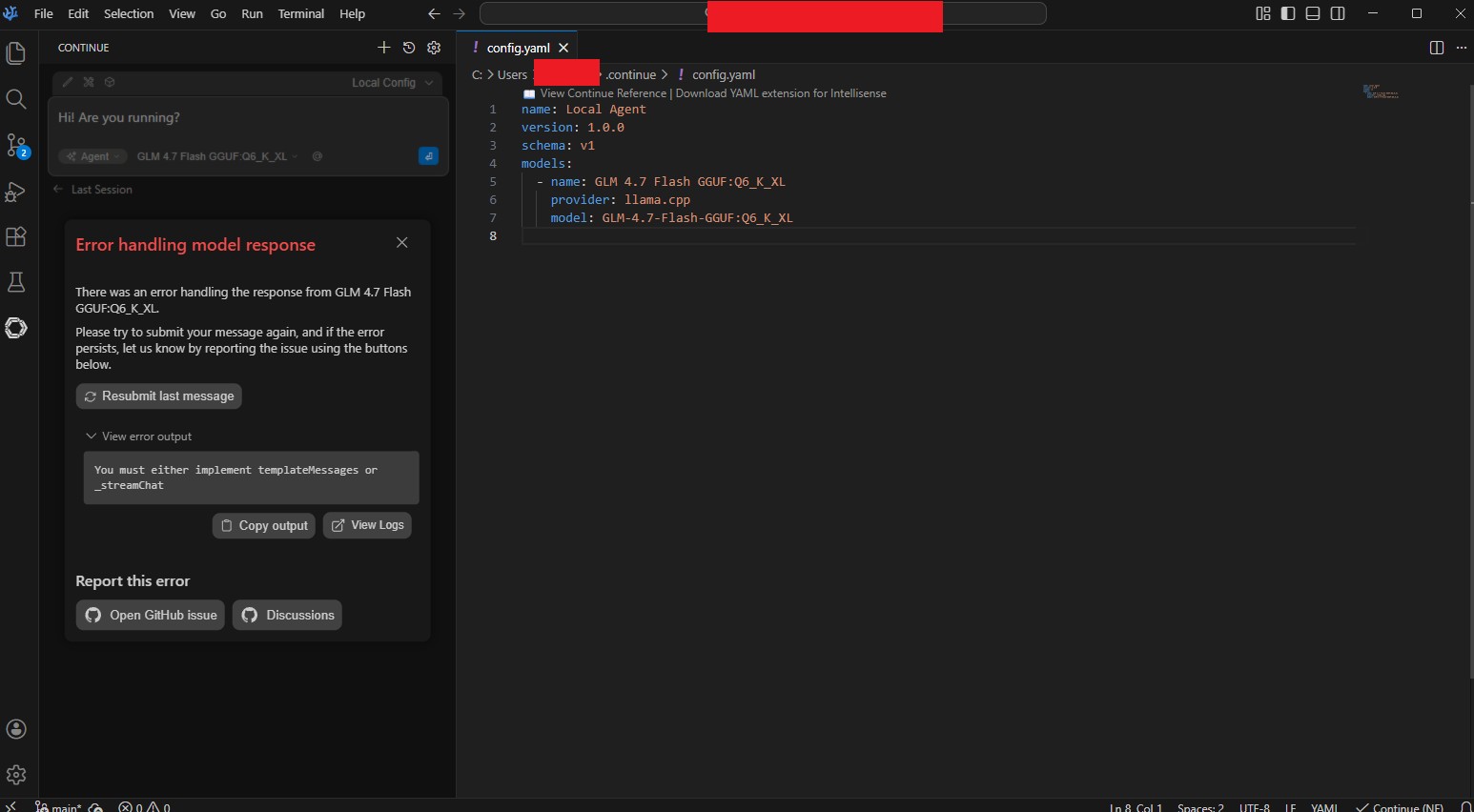
我尝试将Continue配置为使用Llama.cpp与我正在运行的llama-server.exe实例一起工作,但没有成功。这是我的config.yaml:
name: Local Agent
version: 1.0.0
schema: v1
models:
  - name: GLM 4.7 Flash GGUF:Q6_K_XL
    provider: llama.cpp
    model: GLM-4.7-Flash-GGUF:Q6_K_XL
尝试连接时收到的消息是:
There was an error handling the response from GLM 4.7 Flash GGUF:Q6_K_XL.

Please try to submit your message again, and if the error persists, let us know by reporting the issue using the buttons below.
我到底做错了什么?如何让Continue看到这个llama-server实例?请注意附上的截图。
解决方案
我的解决方法是用下面这个命令来运行模型:
.\\llama-server.exe -hf unsloth/GLM-4.7-Flash-GGUF:Q6_K_XL --alias "GLM-4.7-Flash" --host 127.0.0.1 --port 10000 --ctx-size 48000 --temp 0.7 --top-p 1.0 --min-p 0.01 --jinja -ngl 99
并把配置文件改成了这个:
name: Local Config
version: 1.0.0
schema: v1
models:
  - name: GLM-4.7-Flash
    provider: openai
    model: GLM-4.7-Flash
    apiKey: NO_API_KEY_NEEDED
    apiBase: http://127.0.0.1:10000/v1/
    roles:
      - chat
      - edit
      - apply
现在可以工作了!
站内所有文章版权归属LeftHeroAI导航站,无授权禁止任何主体转载、抄袭、复制内容,亦不得私自架设镜像站点。一经侵权,本站将通过法律途径追责。
相关文章






汇集全球数千款 AI 工具,每日持续更新,配套 AI 开发学习资源,轻松用 AI 提升工作效率。快捷键 Ctrl+D/⌘+D 一键收藏本站。